

Instagram Ad Preview — Feed, Reels & Safe Zone Simulator

Preview your Instagram ad in both Feed and Reels modes. See where your caption hits the "… more" fold, check the tighter Reels caption window, and toggle the safe-zone overlay to spot text that collides with Instagram's interface.

Primary text

Live preview

Primary text0 / 125
Display link / Destination URL
Call to action

Previewed in your browser only — never uploaded or stored.

Instagram

Live preview

Fits

you

Sponsored

Add media
Shop Now

you Write your primary text…

Instagram caption limits: Feed versus Reels

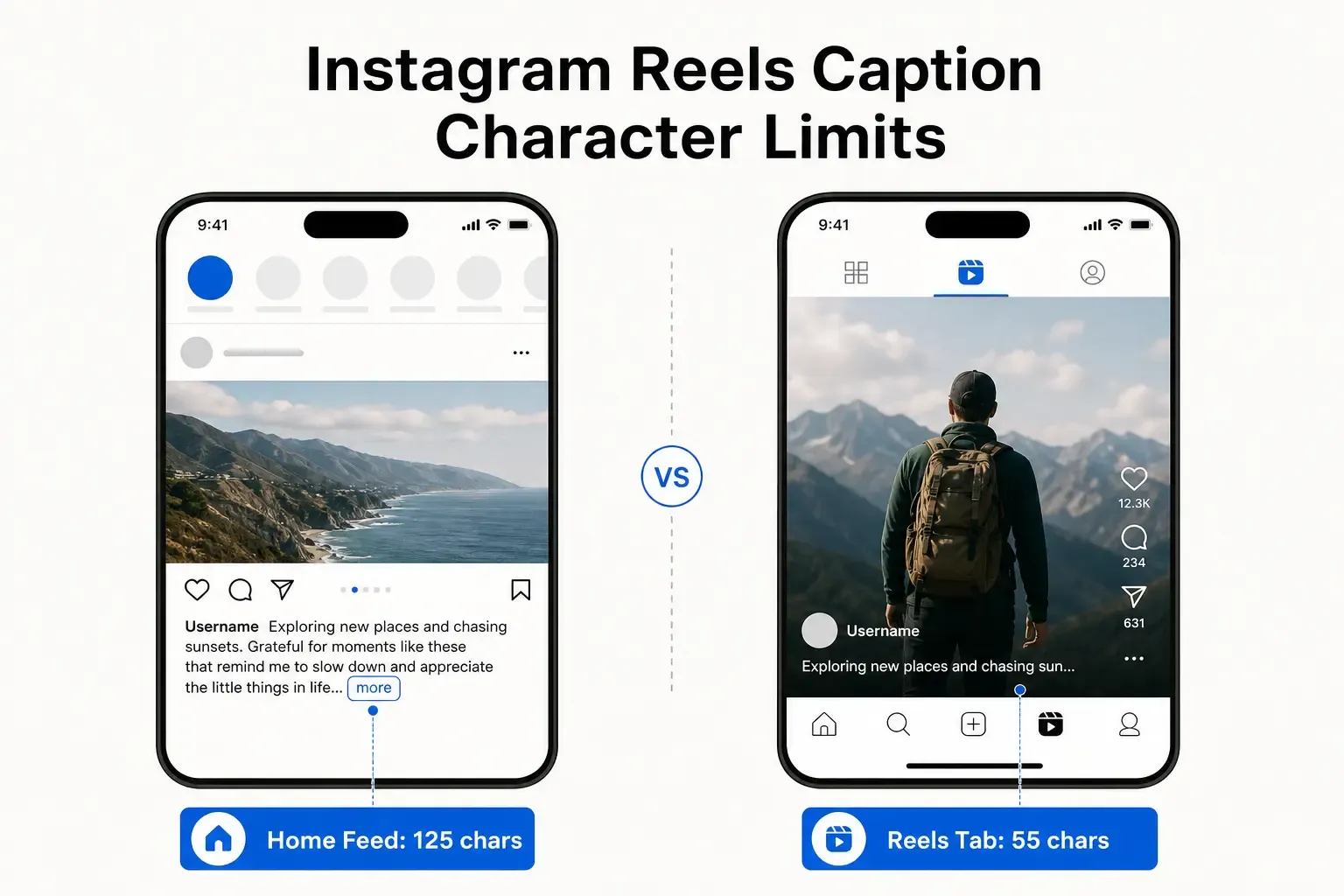
Instagram allows captions up to 2,200 characters, but visibility is what counts. In the Feed, an ad caption is truncated at roughly 125 characters behind a "… more" link — the same practical fold as Facebook. In Reels, the usable space is far tighter: the caption sits over the video with the interface on top of it, so the comfortable window is about 40 to 72 characters before your words start colliding with on-screen controls. The simulator switches between both modes so you can see each cutoff.
Why safe zones make or break a Reel

Reels and Stories overlay your creative with interface elements: the profile and caption block runs along the bottom ~20%, and the action stack — like, comment, share, audio — occupies the right ~15%. Any text or critical subject you bake into those regions gets covered. Toggle the Safe Zone overlay to see these danger areas as translucent bands over your media, so you can reposition important elements before export.

Designing for the interface, not against it

Keep logos, captions, and calls to action inside the clear central column. Treat the bottom fifth and right edge as off-limits for anything that must be read. For Feed ads, front-load the hook in the first 125 characters; for Reels, keep on-creative text short and high-contrast so it survives compression and small screens.

A private, instant preview

PostTruncate runs entirely in your browser — paste a caption and attach a creative and nothing is uploaded or saved. Check the Feed fold, the Reels window, and the safe-zone collisions in real time, then publish knowing your message stays visible.

FAQs

Where does an Instagram Feed caption get cut off?

At roughly 125 characters, after which Instagram shows a "… more" link. Put your hook and key message before that point.

How long should a Reels caption be?

Keep it tight — about 40 to 72 characters. Reels captions sit over the video and compete with the interface, so long captions get covered or pushed behind a "more" tap.

What are Instagram safe zones?

Regions of the screen covered by the interface: the bottom ~20% (profile and caption) and the right ~15% (the action icon stack). Keep important text and subjects out of these areas.

Is my caption or image uploaded?

No. Everything runs locally in your browser. Your caption and any attached creative never leave your device.

Last updated: June 18, 2026

Ready to see how your post really looks?

Paste your draft into the PostTruncate editor and instantly see live previews across LinkedIn, X, Instagram, Facebook, Threads, and TikTok — with fold lines, thread splits, and limit warnings updating as you type. Free, instant, and nothing ever leaves your browser.

Start writing — it's free