



Instagram Reels Caption Character Limit Cutoff Explained
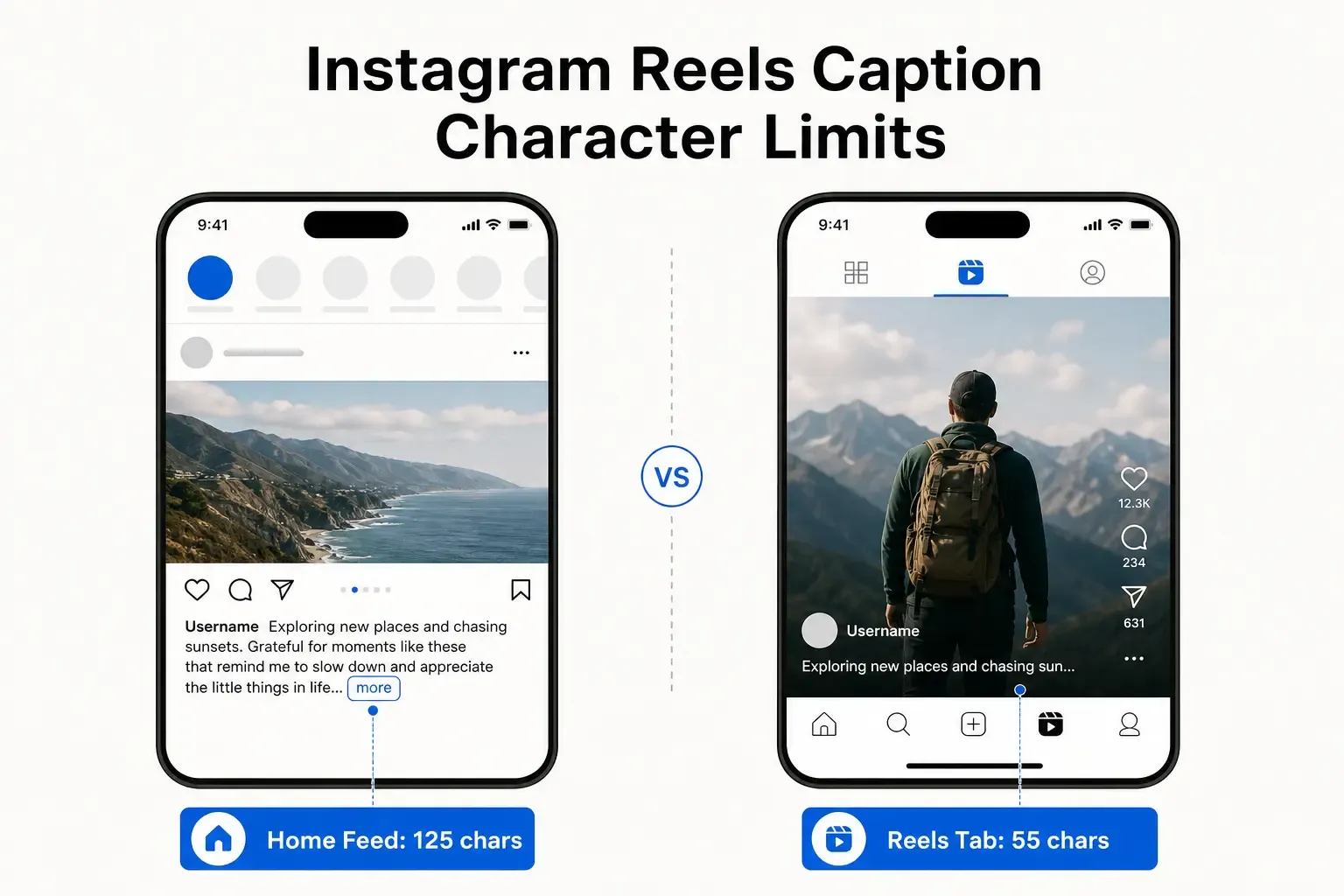
Instagram Reels captions get cut off at 125 characters in the feed - but only 55-60 in the Reels tab. Here's how to write captions that survive both views.
 By Anirudha Published Updated
TL;DR
Your Instagram Reels caption gets cut off at two completely different points depending on where it’s viewed. In the home feed, you get ~125 characters before “more” hides the rest. In the dedicated Reels tab - where many new viewers discover your content - that cutoff is a brutal 55-60 characters. Write your most important hook, question, or value proposition into the first 50 characters, and it survives both. Use the PostTruncate Instagram caption preview tool to test both views before publishing.
You’ve crafted a Reel caption. You’ve checked it on your phone in the feed - hook lands nicely within the “more” fold, good. You hit post.
Then you open the Reels tab and see it. Your perfectly structured caption - the one where the clever question appears at character 92 - is sitting behind a “See more” button. The entire hook is invisible. The viewers who discovered your Reel in that tab (often the majority of cold-audience viewers) never saw it.
This is the dual-cutoff trap, and it bites creators every single day. The reason is that Instagram applies two entirely different truncation rules depending on where a Reel is rendered, and those rules are not equal. As someone who has built tools specifically to solve this problem, I want to break down exactly what’s happening at the code level - and what you can do about it right now.
The two surfaces, the two cutoffs
Instagram Reels exist in two distinct rendering environments, and each has its own caption display budget.
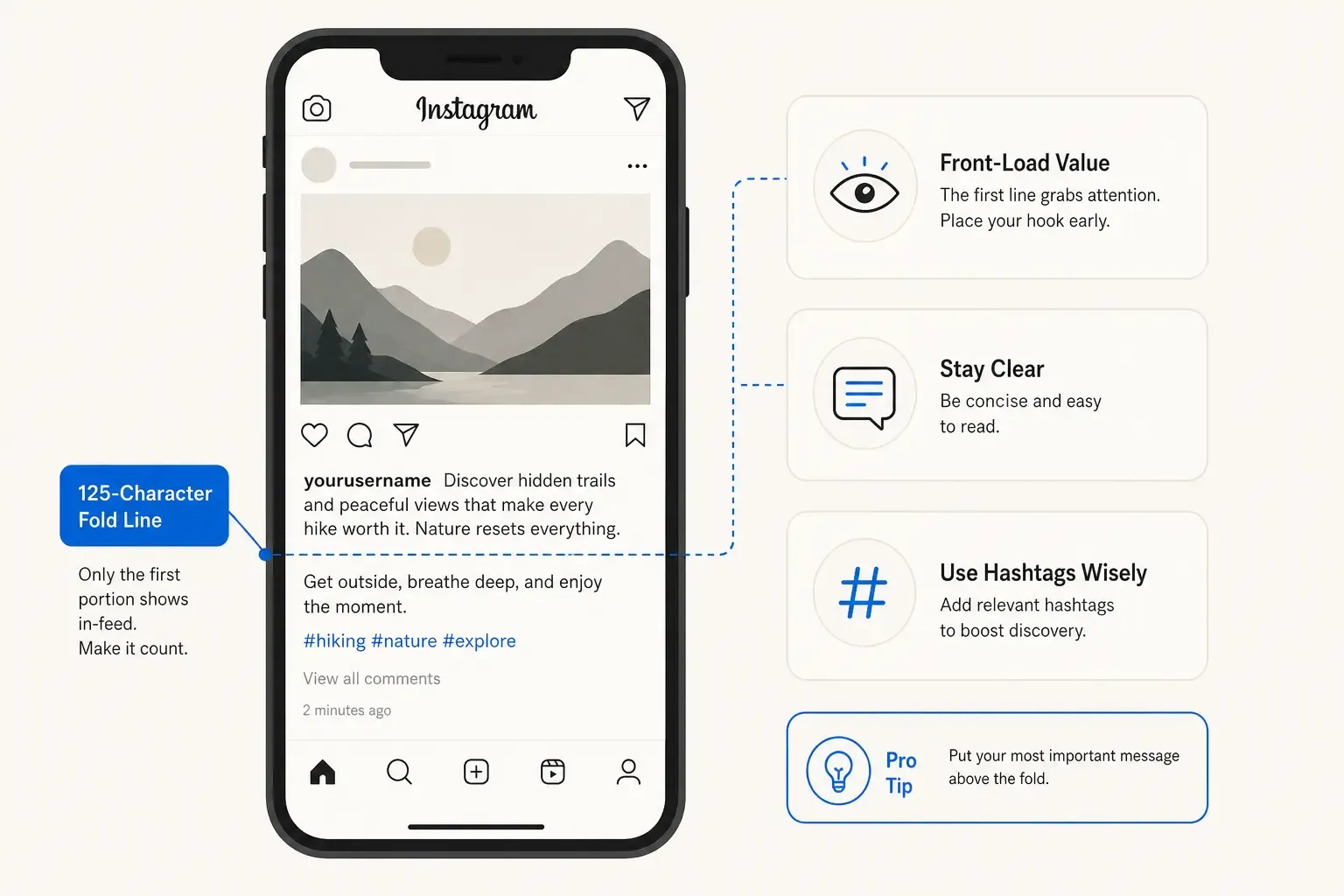
The home feed behaves like a regular post. The caption sits below the video, and Instagram shows approximately 125 characters before collapsing the rest behind a “more” tap. This is the number most Instagram guides reference, and it’s the one creators optimise for.
The Reels tab is a different environment entirely. Here, Instagram uses a full-screen vertical video format - the same visual grammar as TikTok - and the caption overlays a much smaller area at the bottom of the frame. As a result, Instagram truncates Reels tab captions at just 55-60 characters before the “See more” button kicks in.
Side-by-side comparison of Instagram Reels caption cutoff: Home Feed shows 125 characters, Reels Tab shows only 55-60 characters
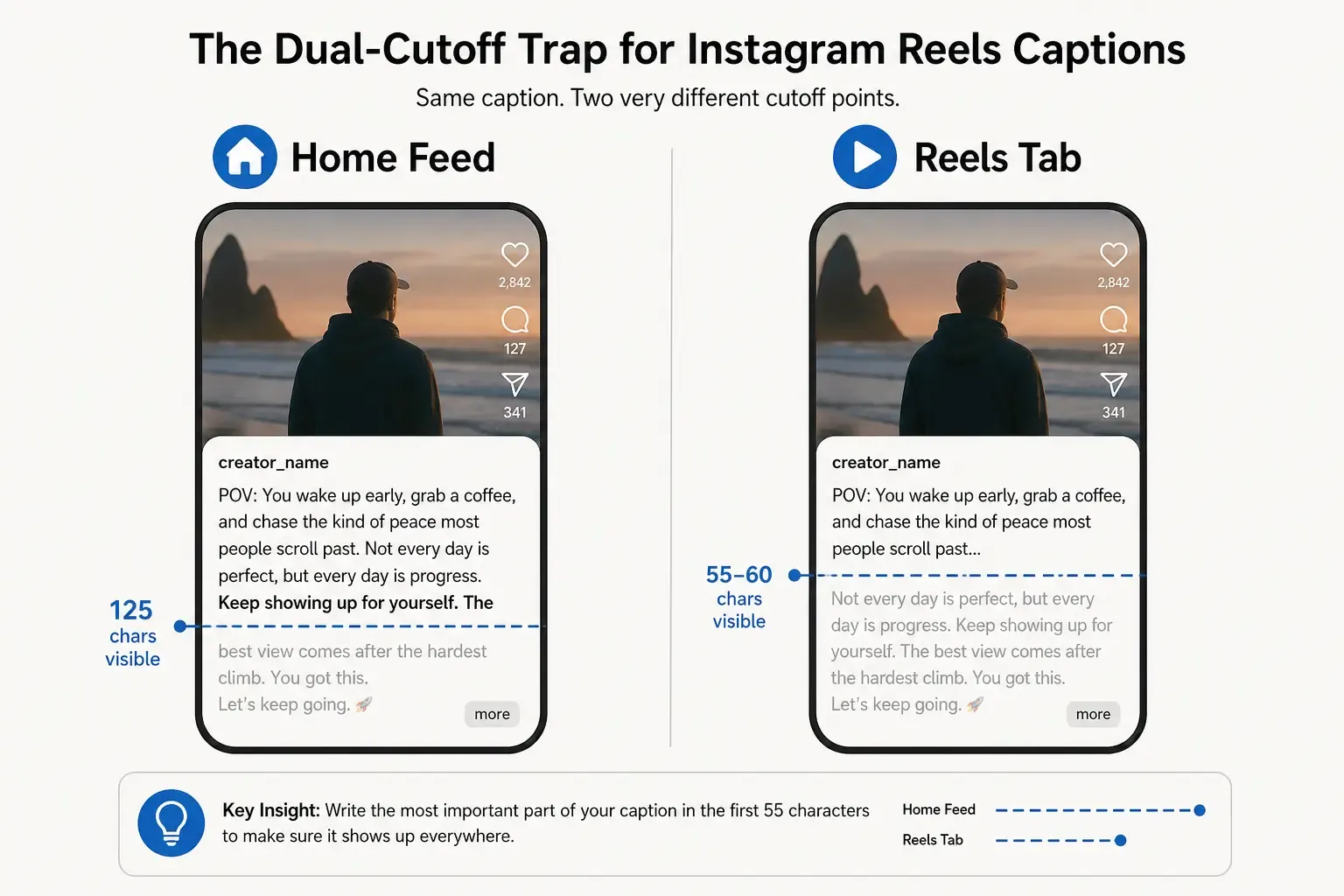
Those two numbers - 125 and 55-60 - represent a 2x difference in what’s visible. A caption optimised purely for the feed fold can have its entire call to action sitting behind a “See more” prompt for anyone viewing from the Reels tab. The punchline you wrote for your existing followers may never reach the new audience the algorithm is trying to show you.
Here’s what the same caption looks like across both views, rendered side by side, using the Instagram caption character limit preview on PostTruncate:
| View | Characters visible | What happens |
|---|---|---|
| Home feed | ~125 | ”more” button appears |
| Reels tab | ~55-60 | ”See more” button appears |
| Hard caption limit | 2,200 | Caption cannot be published |
The 2,200-character hard limit is largely irrelevant for practical purposes. The real limit is 55 characters if you want to guarantee visibility everywhere your Reel appears.
Why does the Reels tab cut so much shorter
The reason isn’t arbitrary. It’s a consequence of the rendering environment.
In the home feed, Instagram displays videos in a card format - there’s structural whitespace above and below the video, and the caption lives in a dedicated block beneath it. That gives the caption room to breathe and show ~125 characters of preview text before collapsing.
The Reels tab is a full-bleed, edge-to-edge vertical video experience. There is no dedicated caption block below the video - text overlays the video itself, in a narrow band at the bottom of the screen. On a standard mobile viewport, that band can only render about 55-60 characters of body text at a legible size before Instagram triggers the truncation. Every character after that gets hidden.
The Reels tab is also where much of Instagram’s algorithmic discovery happens - cold-audience viewers are specifically sent to the Reels tab surface, not the home feed. This is the audience you’re trying to reach with growth content, and they’re hitting your caption at its most aggressive cutoff.
Caption character limits infographic: the 50-character safe zone, the feed-only zone from 51-125 characters, and the hidden zone beyond 125 characters
The 50-character micro-hook strategy
Once you understand the dual-cutoff problem, the solution is straightforward: write your most important content to survive the more aggressive of the two cutoffs.
The Reels tab shows 55-60 characters. That’s your floor. But I don’t recommend writing to the exact edge of 55 because the precise cutoff point varies slightly depending on font rendering, device screen size, and whether the user has their phone in landscape or portrait mode. Building in a small buffer - targeting 50 characters instead of 55 - gives you a reliable safe zone.
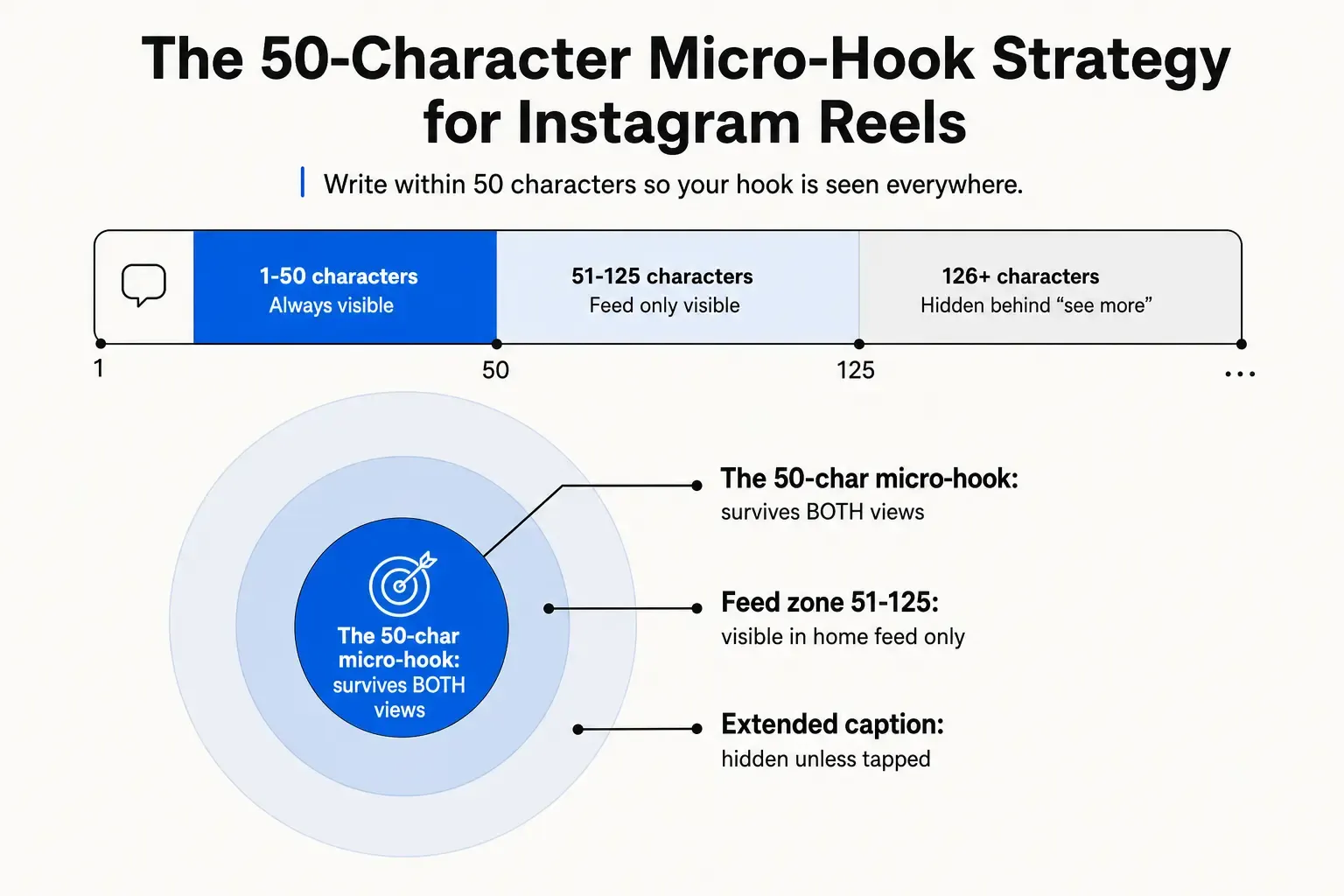
Any text within the first 50 characters of your Reel caption is guaranteed to be visible in both the home feed and the Reels tab, regardless of device.
That constraint sounds punishing until you realise what some of the best-performing Reels do instinctively: they open with a sharp, curiosity-provoking hook that works as a standalone thought. “The mistake costing creators reach” (46 chars) is a complete hook. “3 things I wish I knew before posting” (38 chars) works on its own. “This caption trick doubled my reach” (36 chars) is a tease that earns the tap.
The 50-character micro-hook is not a compromise - it’s a discipline that makes your captions sharper. It forces you to front-load the value proposition and treat everything after as supporting material for people who have already chosen to read further.
What a micro-hook looks like in practice
Let’s take a real example. A social media manager writing about productivity tools might draft this caption:
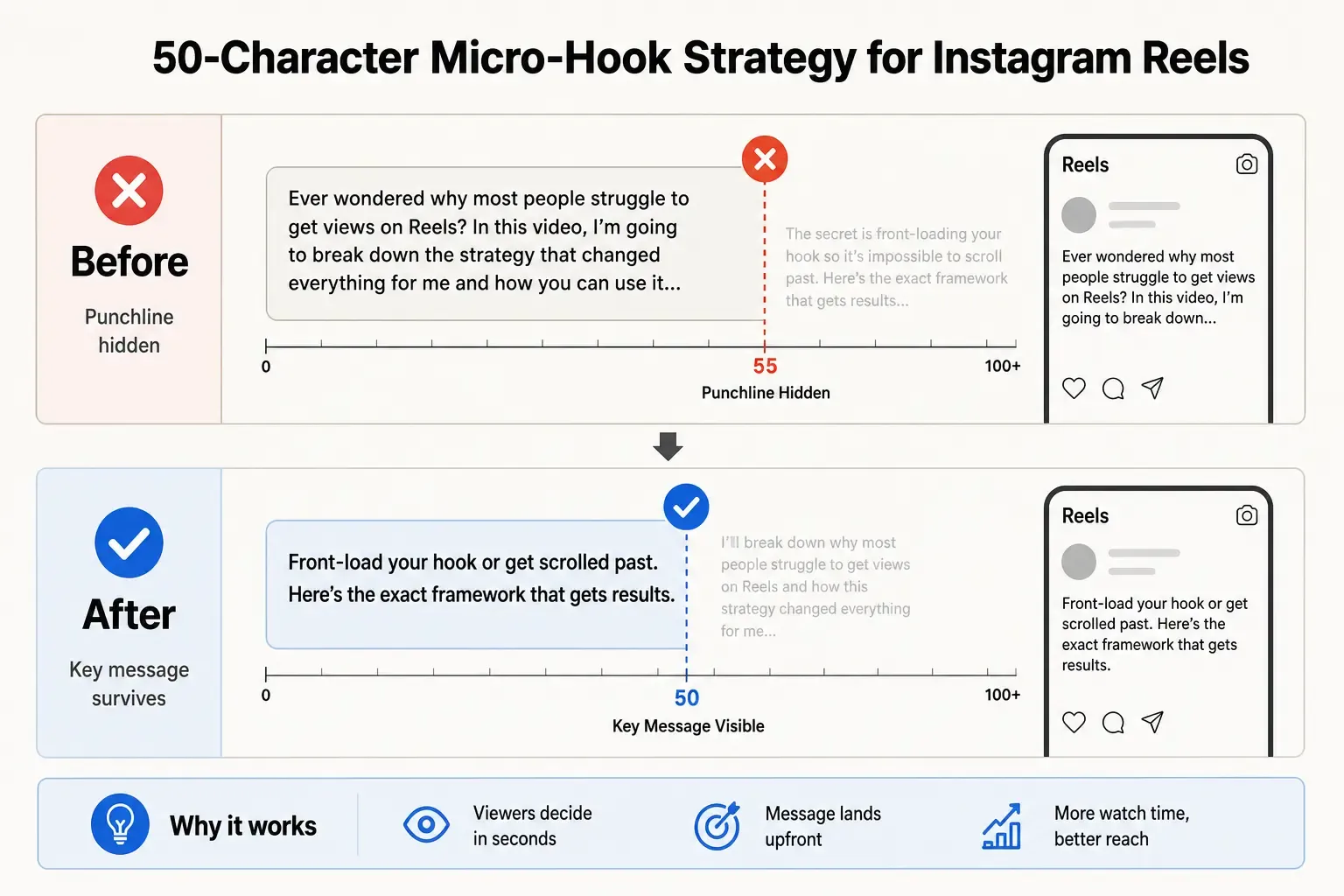
I’ve been testing every social media scheduling tool for 3 months, comparing pricing, feature depth, and time saved per week - here’s the honest breakdown you won’t find in any sponsored post.
That’s 189 characters. It reads fine in the home feed. In the Reels tab, viewers see:
I’ve been testing every social media scheduling tool
The hook - “honest breakdown you won’t find in any sponsored post” - is completely gone. It’s behind “See more.”
Rewritten with the 50-character micro-hook strategy:
Honest review: best scheduling tools 2026 👇
I’ve been testing every scheduling tool for 3 months - comparing pricing, feature depth, and time saved. Here’s what nobody’s saying.
The first 44 characters tell the viewer exactly what they’re getting. The rest supports and expands, but the value prop is already delivered. In the Reels tab, it reads clean.
Before/after comparison showing Instagram Reels caption rewritten with the 50-character micro-hook strategy
Structuring a Reels caption for both views
Here’s the framework I use when writing Reels captions for cross-surface performance:
Layer 1: The 50-character micro-hook (0-50 chars)
One sharp line that works as a complete, standalone hook. This is what cold-audience Reels tab viewers will see. Think of it as a subject line for your video. Keep it tight, lead with curiosity or specificity, avoid setup - start with the payoff.
Layer 2: The feed extension (51-125 chars)
This is visible to home feed viewers but not to Reels tab viewers. Use it to add context, expand the hook, or address the most likely follow-up question a feed viewer would have. This layer is for your existing audience, who already trust you enough to read past the first line.
Layer 3: The full caption (125-2,200 chars)
Visible only to viewers who actively tap “more.” This is where you can go deep: full explanations, numbered tips, links to resources, hashtags, full CTAs. It rewards the most engaged viewers without front-loading cognitive weight on cold audiences.
The structure treats the caption like a funnel: the tighter the zone, the more powerful the message needs to be.
Testing your caption before you publish
The fastest way to apply this in practice is to check both views before hitting post. Manually counting characters while drafting is slow and error-prone. Instagram’s own preview only shows the feed view. And once you’ve published, you can’t see what a first-time Reels tab viewer is reading.
I built PostTruncate’s Instagram caption preview tool specifically to solve this. Paste your caption in, and you see the live fold point update in real time as you type - you can toggle between the home feed view (125-char fold) and the Reels tab view (55-60-char fold) to check exactly what’s visible in each context, before you publish.
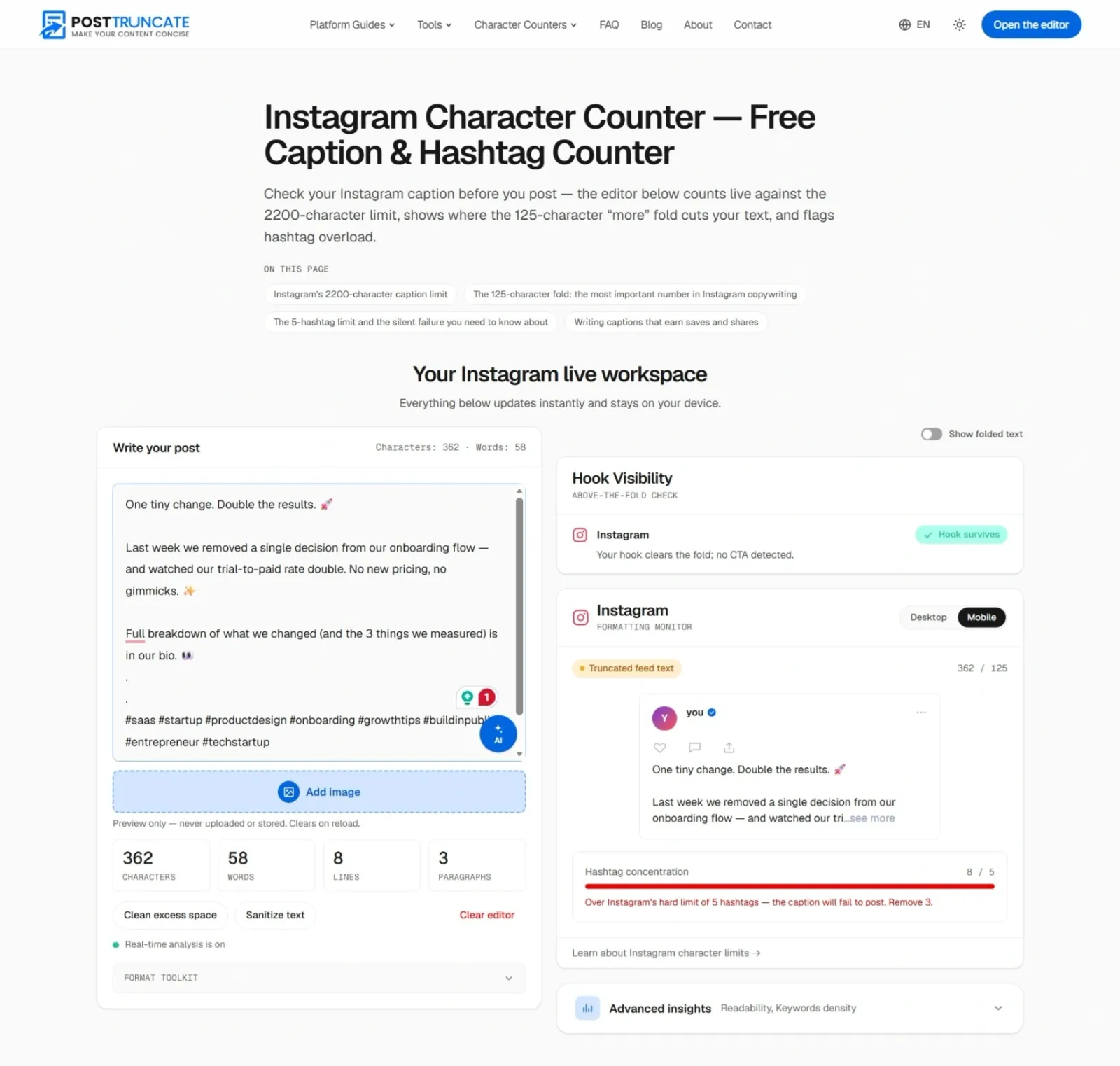
PostTruncate Instagram character counter in action, showing live fold preview for feed and Reels tab views
For advertisers, the constraints are even tighter. If you are boosting a Reel or running a dedicated campaign, use the Instagram Ad Preview tool to verify your ad copy against paid placement limits.
The tool also flags when your hashtag count passes the recommended ~5-hashtag mark (the hard cap is 30) - a separate risk that can suppress reach silently. And it handles all the edge cases: emojis are counted as characters (complex emojis with skin-tone modifiers can register as multiple characters), line breaks count against your total, and the character count updates live across the entire caption.
The workflow I’d recommend:
- Draft your Reel caption anywhere you’re comfortable writing
- Paste into PostTruncate’s Instagram caption previewer
- Check the Reels tab view first - does your hook land within 50- 55 characters?
- Adjust until the micro-hook is fully visible in the Reels tab
- Check the feed view - does the full 125-char preview work?
- Verify hashtag count (ideally 5 or fewer)
- Publish knowing exactly what both audiences will see
It takes about 90 seconds once you’ve done it a few times, and it eliminates one of the most common (and invisible) reasons Reels don’t convert cold audiences.
The invisible audience problem
There’s a deeper reason this matters beyond just caption optimisation. The home feed and the Reels tab represent two fundamentally different audience segments:
Your home feed audience is mostly people who already follow you. They scroll past your Reel in the context of other content they’ve chosen to see. They have context for who you are. A 125-character preview is enough for them to decide whether to engage, because they’ve already opted in to your content.
Your Reels tab audience consists of cold viewers whom Instagram’s algorithm is showing your content to - people who have never seen your account. They have zero context. The 55-60 characters of caption they see in the Reels tab may be the only text they read before deciding to keep scrolling or stop. This is the audience driving discovery and growth.
Optimising only for the feed fold means optimising only for people who already know you. The micro-hook strategy is really about making sure your growth content actually works for the growth-driving surface.
“When you share an Instagram Reel, the first line can be up to 55 characters.” - ePacewalk on Facebook, confirmed independently in community testing
The number has been independently documented by multiple creators and social media tools - it’s consistent across devices and isn’t going away.
Quick reference: Instagram Reels caption character limits
| Context | Visible characters | Notes |
|---|---|---|
| Reels tab (Reels discovery surface) | ~55-60 | Most aggressive cutoff; affects cold audiences |
| Home feed | ~125 | Standard feed fold; same as regular posts |
| Recommended safe zone | 50 | Buffer ensures visibility in both views |
| Hard caption limit | 2,200 | Post won’t publish if exceeded |
| Recommended hashtags | ~5 (30 hard cap) | More than a handful risks silent algorithmic suppression |
Try PostTruncate
I built PostTruncate as a free, browser-based tool that shows you exactly where any platform cuts your text - before you post. For Instagram Reels specifically, the Instagram caption preview renders the real fold point for both the home feed and the Reels tab in real time, so you can see exactly what cold-audience viewers are reading before you hit publish. No account is needed, nothing is stored, and it works on every device.
Paste your next Reel draft into the PostTruncate Instagram caption length checker and see precisely where the Reels tab cuts you off.
FAQs
What is the Instagram Reels caption character limit?
Instagram Reels captions can be up to 2,200 characters long - the same hard limit as regular feed posts. However, the visible limit varies by where the Reel appears: in the home feed, roughly 125 characters show before a 'more' tap is needed; in the dedicated Reels tab, that drops to just 55-60 characters. Use the PostTruncate Instagram caption previewer to see exactly where your caption cuts off in each view.
Why does my Reels caption look different in the Reels tab vs the feed?
Instagram's Reels tab renders captions differently from the home feed. In the Reels tab, the full-screen vertical video format leaves far less room for text, so Instagram truncates at around 55-60 characters instead of the \~125 you see in the feed. The same caption can look fine in the feed and hide its key message in the Reels tab - what creators call the 'dual-cutoff trap.' You can preview both views simultaneously with the PostTruncate live caption previewer.
What is the 50-character micro-hook strategy for Instagram Reels?
The 50-character micro-hook strategy means front-loading your most important value proposition, question, or cliffhanger into the first 50 characters of your Reel caption. Since the Reels tab shows 55-60 characters before cutting off, anything within that 50-char zone is guaranteed to be visible whether someone discovers your Reel in the feed OR the Reels tab. It's a safety buffer that ensures your hook survives both surfaces.
How do I check where my Instagram Reels caption will be cut off?
The fastest way is to paste your caption into the PostTruncate Instagram caption preview tool, which shows the exact fold point in real time as you type. You can toggle between Home Feed view (125-char fold) and Reels Tab view (55-60-char fold) to see precisely where your text gets cut in each context - before you publish.
Does the Instagram Reels caption character limit affect reach or algorithm performance?
Instagram's algorithm doesn't penalise you for caption length, but truncation affects human engagement. If your hook is hidden behind a 'See more' tap in the Reels tab, most viewers who discover your content there will scroll past without engaging. Front-loading the most compelling part of your caption - within the 50-character safe zone - maximises the odds that a cold viewer stops to watch or interact with your Reel.


Join the discussion
Comments are reviewed before they appear, so yours won’t show up right away.