



Instagram Caption Limits & Hashtag Rules 2026
The exact 2026 limits for Instagram captions, hashtags, and account tags-plus why the 125-character fold matters more than the 2,200-character ceiling.
 By Anirudha Published Updated
TL;DR
Instagram captions max out at 2,200 characters, but the feed folds at roughly 125 characters - so your hook either lands before the fold or disappears. On hashtags, ~5 is the recommended sweet spot - the hard cap is 30, and only past that does a post actually fail to publish - but stacking far more than a handful risks looking spammy and getting quietly suppressed. Use a real-time caption preview tool to see exactly what survives the fold before you publish.
The problem every creator hits
You craft the perfect caption. It’s witty, it drives engagement, the hook is tight. You hit post on Instagram, pull up the feed to check it… and your opening line is invisible. Everything past 125 characters hides behind a “more” tap. Or you pile on hashtags thinking they’ll boost reach, and the post quietly reaches almost nobody - no error message, just silence.
Instagram’s character limits aren’t a mystery, but they’re not what most creators think they are. The platform doesn’t fail because you hit 2,200 characters. It fails because you didn’t account for the fold, because you packed in too many hashtags, or because you added formatting that truncates differently on mobile than it does on desktop.
I’ve been building formatting tools long enough to see the pattern: creators know about the limits, but they discover the rules the hard way - after they’ve already published something that didn’t land the way they intended. Let’s fix that.
Instagram’s actual caption limits in 2026
The 2,200-character hard ceiling
Instagram captions top out at 2,200 characters - feed posts, Reels, carousels, it’s the same across the board. If you go over, the caption simply blocks, and Instagram stops you before you can publish. That’s the easy one to understand.
The problem is that the hard limit isn’t what matters for engagement. The fold is.
The 125-character fold: where the hook actually lives
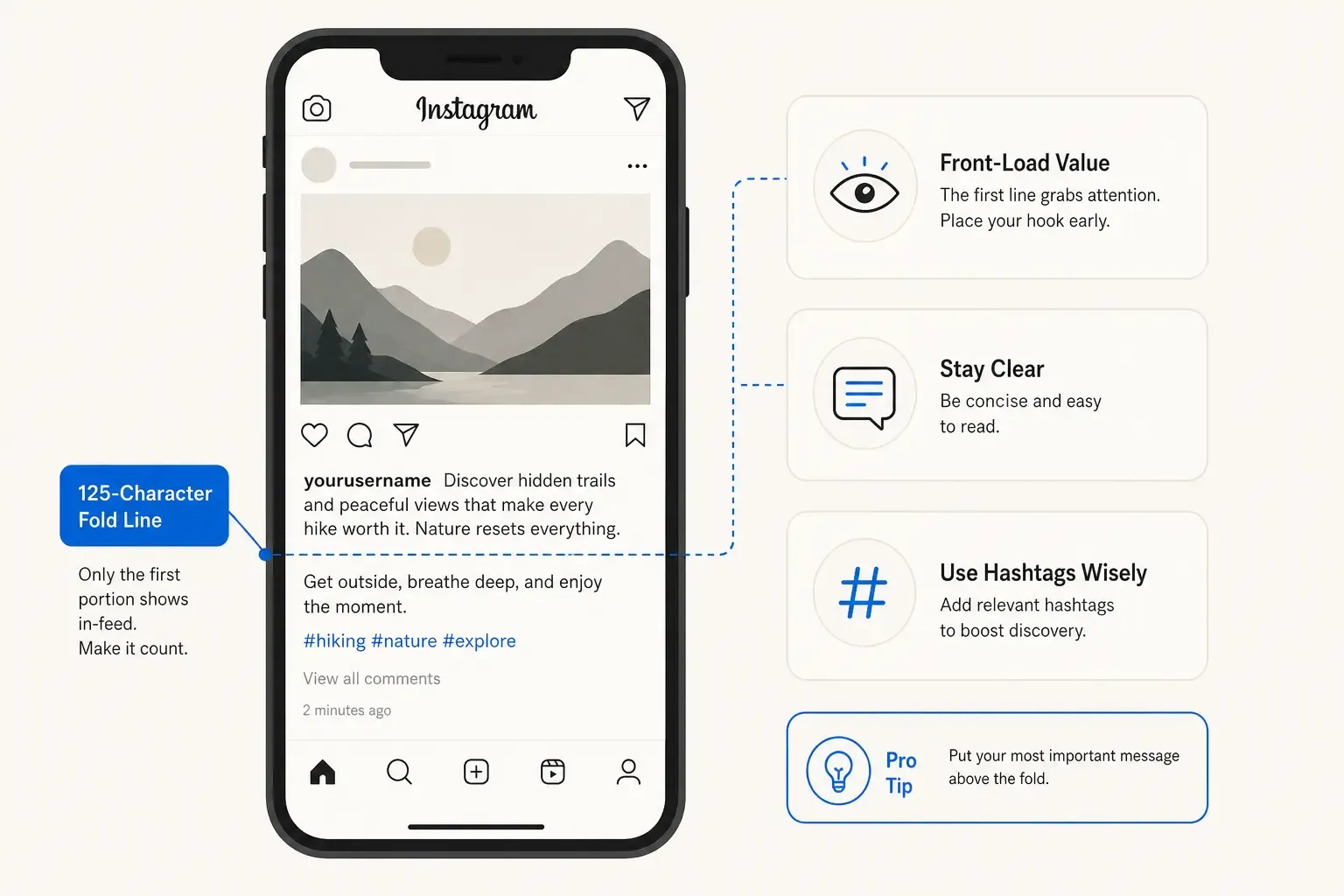
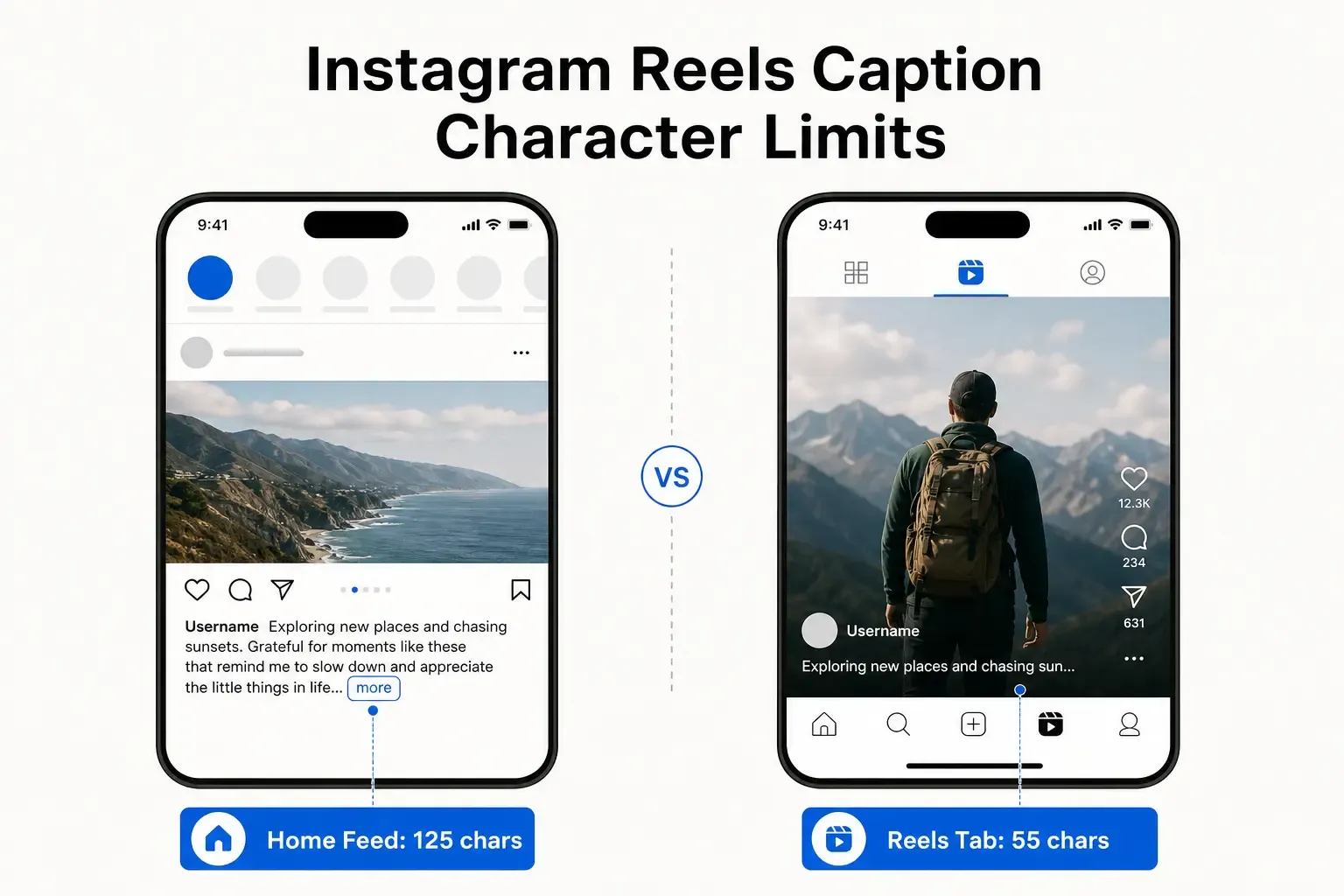
While the caption can run to 2,200 characters, the Instagram feed collapses your caption at approximately 125 characters. Everything after that hides behind a “…more” tap.
This is where most captions fail.
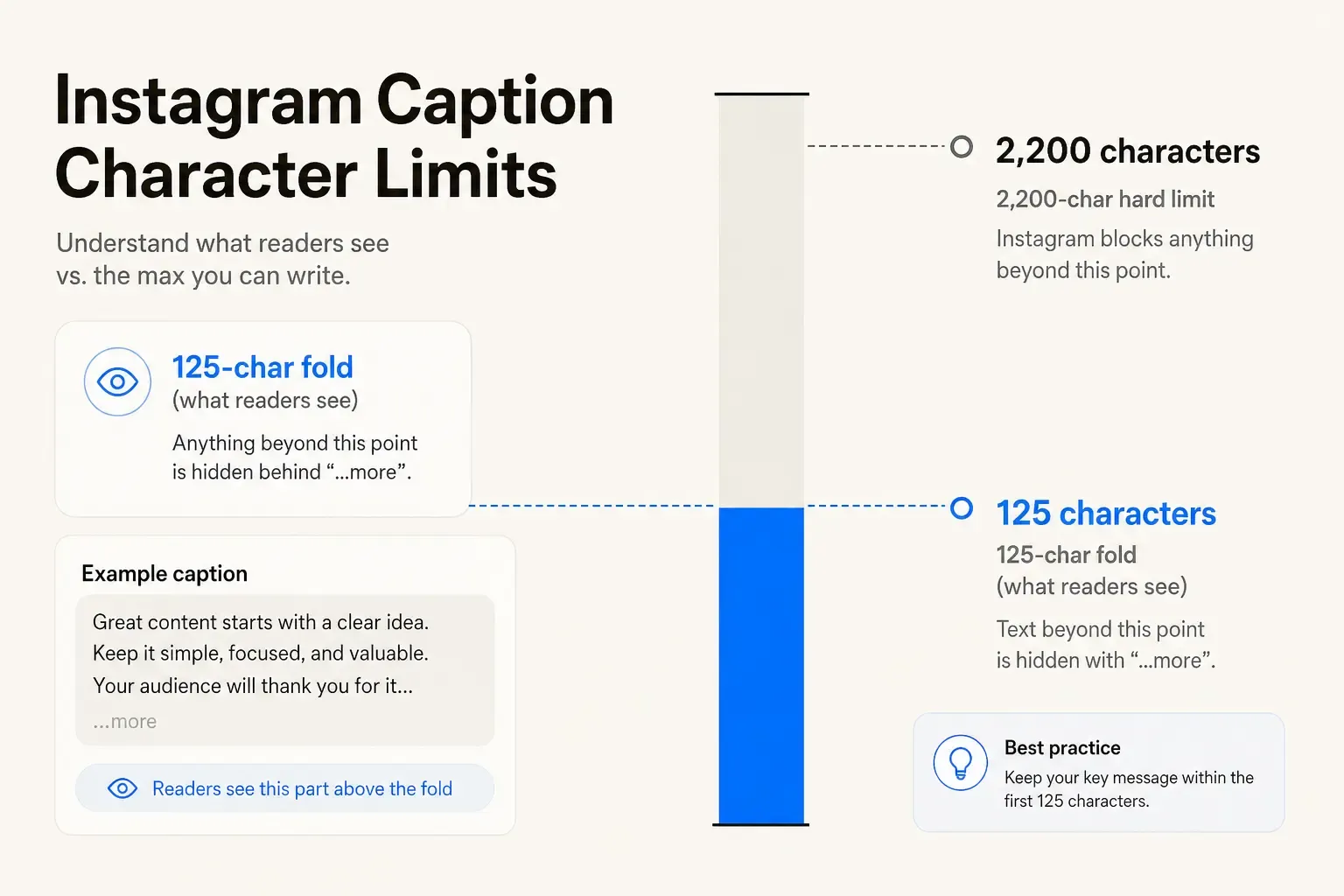
Instagram caption character limits: 2,200-character hard limit with 125-character feed fold
Your reader opens the feed, sees an image, and reads maybe the first line of your caption before deciding whether to engage. If your hook - the reason they should care, the promise, the curiosity - isn’t in those first 125 characters, they skip it. They don’t tap “more.” They don’t read the rest of what you wrote.
The algorithm doesn’t reward invisible engagement. Instagram’s algorithm weights saves more heavily than likes, and people save content that made them stop scrolling. That happens in the fold.
Treat the 125-character window as its own discipline. A complete, curiosity-provoking thought. A promise. A specific detail. Anything that earns the “more” tap. Write the body below the fold, sure - but the opening line is do-or-die.
The hashtag sweet spot (the rule that isn’t written down)
Here’s where it gets spiky.
Instagram’s documented maximum is 30 hashtags per post - go past that and the caption won’t publish. But there’s a far more dangerous undocumented threshold: once you stack well beyond a handful of tags, the post can quietly reach almost nobody, with no error message at all.
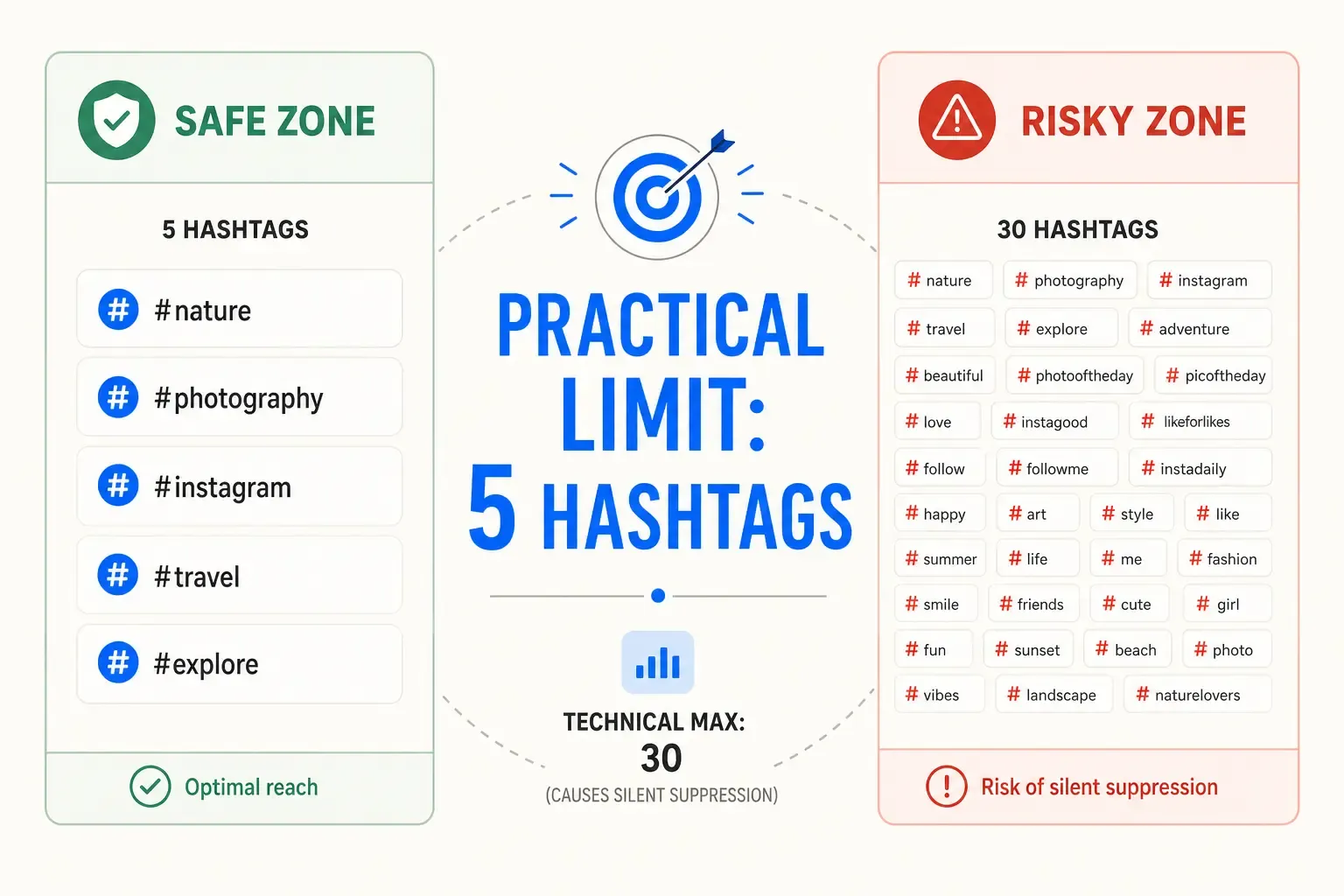
Instagram hashtag limits: 5 hashtags (safe) vs 30 hashtags (risky silent suppression)
Instagram’s spam filters treat heavy hashtag stacking as inauthentic behavior. In the current algorithm climate, many accounts report silent suppression - the post appears to publish, it’s in their profile, but it reaches almost nobody. No notification, no explanation, just… silence.
The practical safe ceiling most creators have landed on is 5 highly relevant hashtags. Not 10. Not 30. Five, chosen for genuine topical alignment rather than volume.
PostTruncate’s caption analyser counts your hashtags in real time and flags when you exceed the threshold before you hit publish.
Account tags and @mentions
Instagram allows multiple account tags and @mentions in captions. The platform doesn’t enforce a hard per-post limit, but tagging too heavily in a single caption reads like spam and suppresses reach the same way overloaded hashtag lists do. One or two strategic tags - tagging a collaborator, a brand, a partner account - lands better than turning the caption into a notification cascade.
Why the fold matters more than you think
Three paragraphs. A detailed product description. A behind-the-scenes story broken into sections. All of that can live below the fold. But if your first sentence doesn’t earn the tap to expand, nobody ever reads it.
The best Instagram captions front-load the payoff. The specific promise. The number. The “here’s why this matters to you.” Then the detail follows.
Example structure:
- Line 1 (above the fold): The hook. The specific thing that makes them stop.
- Line 2-4: The context or proof.
- Remaining body: The story, the texture, the call to action.
Draft your caption, check the fold preview in PostTruncate’s Instagram character counter, and adjust the opening until the most compelling part is visible in the feed.
The pro tip: Use a real-time caption preview
Most creators toggle between their note app and Instagram, pasting drafts to check how they’ll look. Or they draft in the Instagram app itself, only to realize the formatting broke, the fold cut off the key sentence, or they went over the limit halfway through.
PostTruncate’s Instagram caption counter eliminates that back-and-forth. You type your caption once, and it renders the way Instagram actually will - the exact fold point, the character count updating in real time, the hashtag count flagged if you overshoot the safe ceiling. You see the final result before you commit.
Everything runs in your browser. Your text never uploads anywhere, and the tool is free. Draft, review, copy straight to Instagram - one clean pass, no app switching.
The catch-everything details:
- Real-time character count showing exactly where you stand against the 2,200 limit
- Live preview of where the 125-character fold falls
- Hashtag counter flagging when you pass the recommended ~5 tags (and the 30 hard cap)
- Format tools for quick case changes, emoji stripping, and hashtag extraction
- Works offline and doesn’t store anything
The formatting traps that tank reach
Beyond the limits themselves, a few silent failures crater performance:
Invisible characters. Zero-width spaces, fake Unicode “fancy fonts,” and other hidden characters break word counts and confuse screen readers. PostTruncate catches these automatically and flags them before you publish.
Line breaks eating space. Each line break is a character. Multi-paragraph captions with lots of white space are beautiful to write but expensive in character count. If you’re structuring with line breaks, count them.
Emojis that count double. Most emoji count as one character, but some - especially variations and skin tone modifiers - count as two or more. The counter accounts for this.
Hashtag placement. Hashtags work better at the end of the caption or in the first comment, not scattered through the body. Front-loading hashtags makes the opening line less readable and doesn’t improve reach.
The checklist before you hit post
- Check the fold. Is your hook in the first 125 characters? Does it make sense to tap “…more”?
- Count hashtags. Aim for 3–5 relevant tags. Flag any caption over 5 as a spot check.
- Scan formatting. Line breaks, emoji, special characters - make sure nothing’s hiding and everything loads as intended.
- Preview on both mobile and desktop. The fold point is similar, but mobile is where most Instagram traffic happens - test there first.
- Check the character total. Are you under 2,200? PostTruncate’s counter shows this in real time.
Try PostTruncate for Instagram captions
If Instagram formatting is a recurring headache - captions that don’t render the way you planned, hashtags that disappear, the fold cutting off your hook - PostTruncate’s Instagram caption counter is built for exactly this.
It’s free, privacy-first (nothing uploads), and runs entirely in your browser. Draft once, see exactly what Instagram shows, and publish with confidence. The tool also works for LinkedIn, X (Twitter), TikTok, Threads, and Facebook - one workspace for every platform you’re on.
Head over to PostTruncate and try the Instagram character counter right now. Paste a caption you’ve been struggling with, watch the fold preview update in real time, and see exactly what your audience will read before they tap “more.”
FAQs
What is Instagram's caption character limit in 2026?
Instagram captions can hold up to 2,200 characters - enough for a short essay or detailed product description. Going over the limit blocks the caption, so you'll know before you publish. Every character counts: emojis, spaces, line breaks, everything.
Why does Instagram show '...more' and hide my caption?
Instagram collapses captions after roughly 125 characters in the feed - everything after that hides behind a tap. This fold is where most creators lose readers. The hook, the CTA, the reason someone should tap "more"-all have to land in that first 125 characters, or your audience never sees it.
How many hashtags should I use on Instagram?
You can technically add up to 30 hashtags, but the practical safe ceiling is 5 highly relevant tags. More than that looks spammy and can trigger Instagram's spam filters, causing silent suppression where your post appears to publish but reaches almost no one. Quality over quantity always wins.
Do emojis and line breaks count toward Instagram's character limit?
Yes, completely. Emojis, spaces, and every single line break count as characters against the 2,200 limit. Line breaks eat space especially fast when you're structuring a multi-paragraph caption, so count them if you're running close to the ceiling.
How do I avoid hitting Instagram's limits and formatting errors?
Use a real-time caption preview tool like PostTruncate's Instagram caption counter that shows exactly where the fold falls, flags hashtag counts, and tracks characters as you type. Draft once, see what Instagram actually shows, and publish with confidence-no copying to the app to check.


Join the discussion
Comments are reviewed before they appear, so yours won’t show up right away.