



How Many Links Can You Put in a Threads Post?
Threads enforces a strict 5-link maximum per post. Here's what triggers the error, who it hurts most, and exactly how to work around it.
 By Anirudha Published

TL;DR
You can put up to 5 links in a single Threads post. Exceed that, and the post fails with a hard API error - THREADS_API__LINK_LIMIT_EXCEEDED - Enforced since December 22, 2025. For affiliate marketers and newsletter writers sharing resource roundups, that limit bites fast. The practical fixes: spread links across a sequential thread (5 per post, no cap on posts), push overflow links into your bio using a Linktree-style tool, or shorten URLs to reduce total count. Before any of that, use the PostTruncate Threads character counter to count your URLs as you draft - catching the problem in the editor beats getting blocked on publish.
The 20-minute post that never went live
Picture it: you’ve spent the better part of half an hour writing a Threads deal roundup. Eight affiliate links, each one carefully checked, each one pointing to a live, commissionable product. The copy is tight. The hook is good. You paste it into the app and tap publish.
Nothing.
No useful message. Just a failed post and a quiet moment of confusion as you wonder what on earth went wrong. Did the app glitch? Did a URL break? Did a hashtag cause a problem?
The real answer is simpler and more frustrating: you broke an undocumented rule that the platform doesn’t bother explaining when it blocks you. Threads has a hard 5-link maximum per post. Post with six or more unique URLs and the whole thing fails - no warning, no partial publish, no explanation beyond a cryptic error code if you’re using the API.
I’ve built PostTruncate to help creators avoid exactly this kind of silent failure. The 5-link limit is one of the rules most people don’t know about until they’ve already hit it.
As of December 22, 2025, Meta’s official Threads API documentation states:
“The number of links is restricted to 5 or less. Starting December 22, 2025, Threads posts containing more than 5 links will fail to post during the media creation step with the error code:
THREADS_API__LINK_LIMIT_EXCEEDED.”
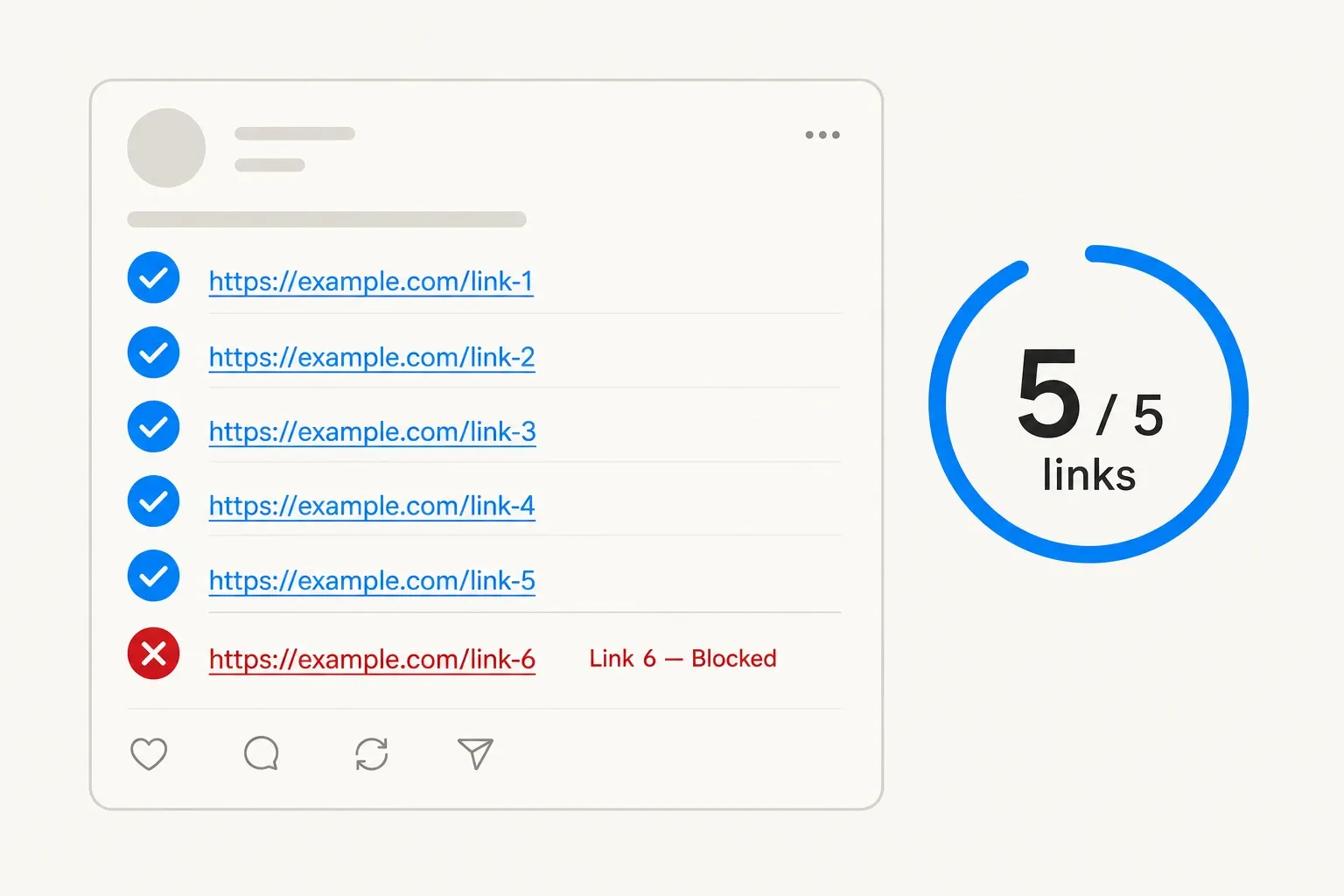
The Threads 5-link rule: how links are counted and where the block triggers, as taken from Meta's developer documentation
A few things worth noting about how the count works:
- Unique URLs only. If you paste the same link twice, Threads counts it once. Repetition doesn’t inflate the count.
- The link attachment counts separately. If you attach a preview card to your post (the link_attachment field in the API), that URL counts as an additional link - unless it’s already present in the post text, in which case it only counts once.
- There’s no limit on the length of each URL. Unlike X, which collapses every link to a flat 23 characters via t.co, Threads counts links at their full character length. A 90-character affiliate URL consumes 90 of your 500-character budget, not 23. This is a separate gotcha from the 5-link cap, but the two together define the real constraint space for link-heavy posts.
The limit applies to text-only posts. Image, video, and carousel posts are handled differently by the API, so the documented 5-link cap is specifically a text post rule.
It’s also worth knowing this rule existed - just less formally - before December 2025. The open-source scheduling tool Postiz documented a 3-link limit that was triggering a generic bad_body error well before Meta formally documented the policy. The threshold moved from 3 to 5, and the error code got its own name. The vague blocking behaviour predates the clean documentation by months.
Who actually hits this limit
The 5-link cap doesn’t bother most casual Threads users. A single brand mention, a portfolio link, a podcast URL - most personal posts sit well under the ceiling. The people who run into it are the ones whose posts are the links:
Affiliate marketers running deal roundups, product comparisons, or “best of” lists. Even a conservative “top 5 picks” post hits the limit exactly. Add a disclosure link and a brand link, and you’re already at 7.
Newsletter writers who cross-post their issue highlights to Threads, linking out to source articles, referenced tools, and a subscribe link.
Social media managers assembling resource threads for clients - link-heavy content is the entire format.
Deal-hunters sharing time-sensitive offers across multiple retailers.
For all of these, the 5-link limit is not an edge case. It’s a regular constraint that requires an actual strategy.
Three ways to work around it
1. Spread links across a multi-post thread
The cleanest workaround for lists that genuinely need more than 5 links: split the post into a thread. Each individual post in a Threads thread carries its own 5-link budget. A three-post thread can hold 15 unique links total.
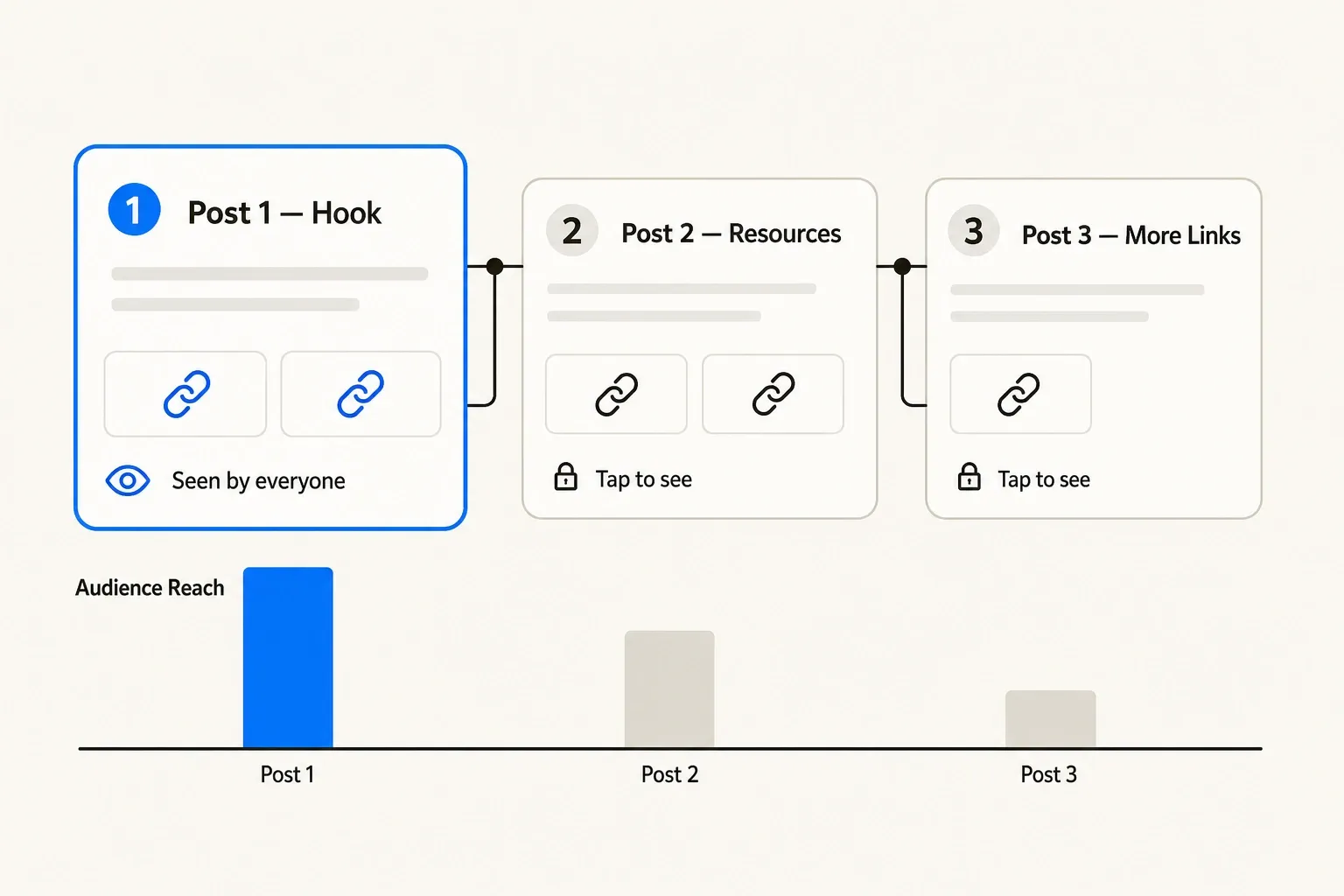
Multi-post thread strategy: distributing links across Posts 1, 2, and 3 with decreasing reach at each step
The catch - and it’s a real one - is that reach drops off at each step. Post 1 is what appears in the feed and gets the full audience. Posts 2 and 3 are only visible to people who tap in. If your highest-value affiliate links are buried in Post 3, most of your audience never sees them.
Structure the thread accordingly:
- Post 1 should contain your hook and your best-performing links. Write it so it stands alone as a compelling post. Someone who never taps further still sees your two or three strongest recommendations.
- Post 2 carries the next tier. Frame it so it rewards the readers who engaged with Post 1 - more detail, more context, the “if you liked those, also check these” layer.
- Post 3 onward is for completists. These posts reach a fraction of your original audience; don’t put commission-heavy links here if you can avoid it.
The thread format works well for structured content - a numbered list, a comparison by category, a “beginner vs. advanced” split. It works poorly for content that’s only useful when read in full, since most readers won’t tap through.
2. Push overflow links into your bio
Threads now supports up to 5 separate links in your bio - entirely separate from the per-post limit. That’s a meaningful secondary channel for affiliate marketers.
The standard execution: put a Linktree or similar link-in-bio page as one of your bio links. Your Linktree can hold an unlimited number of affiliate links. Your Threads post text then carries a single call to action - “my full list is linked in bio” - rather than six individual URLs.
This approach trades click depth for simplicity. Users have to leave the post, find the bio, click through to Linktree, then click the affiliate link. That’s a longer path than a direct post link. For high-intent audiences who follow you specifically for deals, the conversion rate usually survives the extra step. For cold discovery posts where you’re reaching people who don’t know you yet, the drop-off is higher.
Use the bio strategy for your evergreen link set - your go-to affiliate pages, your top-performing products, your newsletter subscribe link. Keep the post itself for the time-sensitive, high-priority items that benefit most from being one tap away.
3. Shorten URLs before posting
URL shorteners don’t directly help with the link count - 1 short URL is still 1 link toward the 5-link cap. But they serve two adjacent purposes:
Character budget. On Threads, links count at their full character length. An affiliate URL like https://www.amazon.com/product/ref=long-tracking-parameter?tag=youraffiliate might run 90+ characters. Shorten it to a 20-character Bitly link, and you reclaim 70 characters of your 500-character post budget.
Deduplication. If you’re linking to the same product on multiple platforms in the same post (a practice some affiliate programs allow), URL shorteners can sometimes make near-duplicate links look distinct. That doesn’t change Threads’ unique URL count logic, but it keeps your post cleaner.
URL shortening is a supporting tactic, not a standalone fix for the 5-link limit. Combine it with the thread strategy or bio strategy for posts where you legitimately need more than 5 destinations.
Why drafting outside the app matters
The Threads app doesn’t show you a link count. You write, you tap publish, and if you’ve gone over 5 links, you find out by getting blocked.
That’s a workable feedback loop for casual posts. For a 30-minute affiliate roundup, it’s painful - and unnecessary.
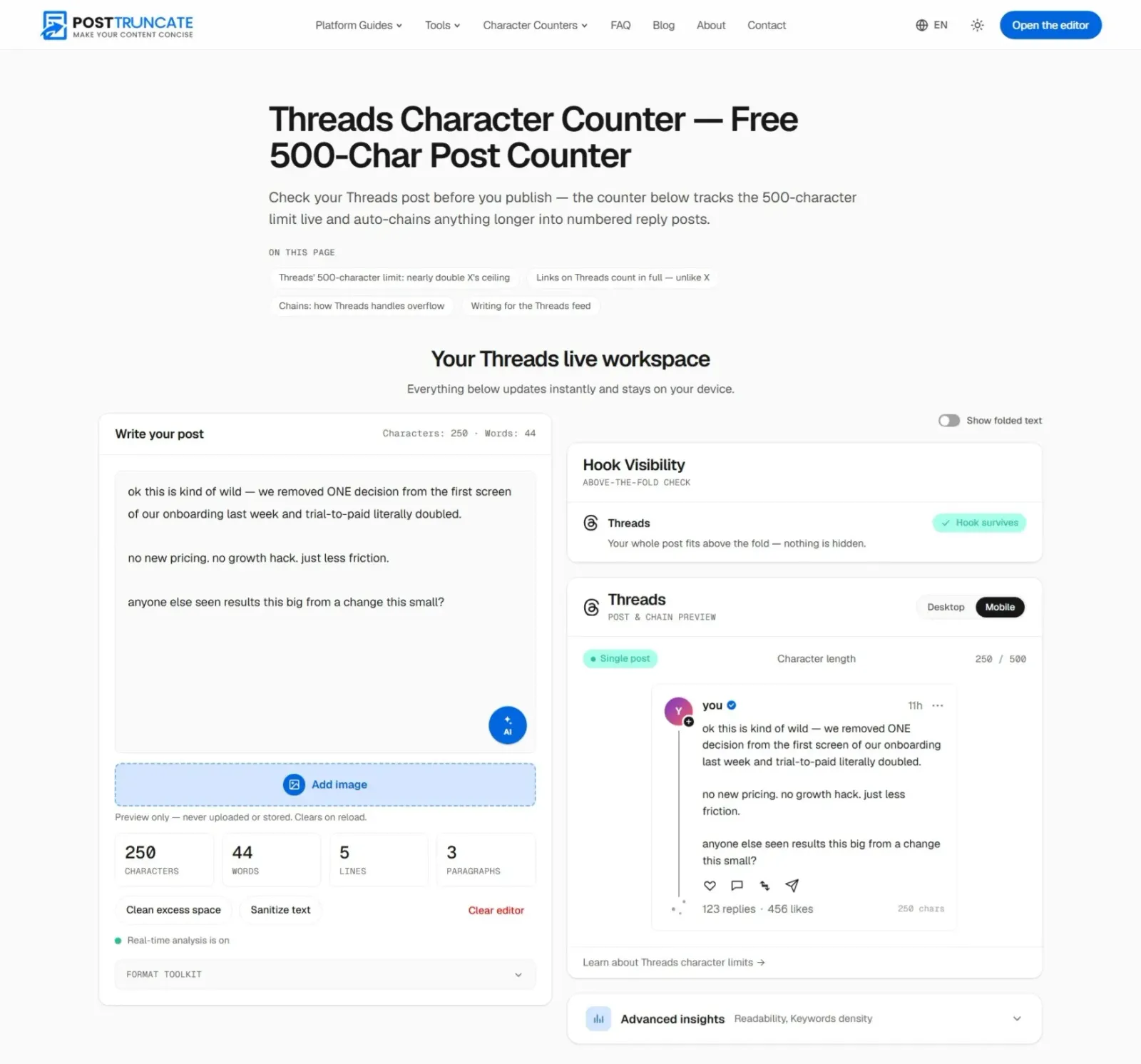
PostTruncate Threads character counter showing real-time URL tallying and character count before publishing
The PostTruncate Threads character counter tallies both your character count and your URL count as you type. You can see at a glance whether you’re at 3 links, 5 links, or 7 - before you ever open the Threads app. The editor also applies correct per-platform link counting, so the character budget it shows you reflects the actual rules Threads uses: full URL length, not the 23-character t.co shortening that X applies.
A few things this changes in practice:
- You can front-load your thread planning. Paste your full list of links into the editor, see the count immediately, and decide in the draft stage - not after a failed publish - which links belong in Post 1, which go to Post 2, and which get pushed to bio.
- You get accurate character counts for each post in the chain. Threads folds the feed view at around 250 characters on mobile. The editor shows you where that fold falls so your Post 1 hook survives it.
- The chain splitter automatically divides overflow content into 500-character segments, breaking at sentence boundaries. If your affiliate roundup runs long, you can see the full thread shape before committing to it.
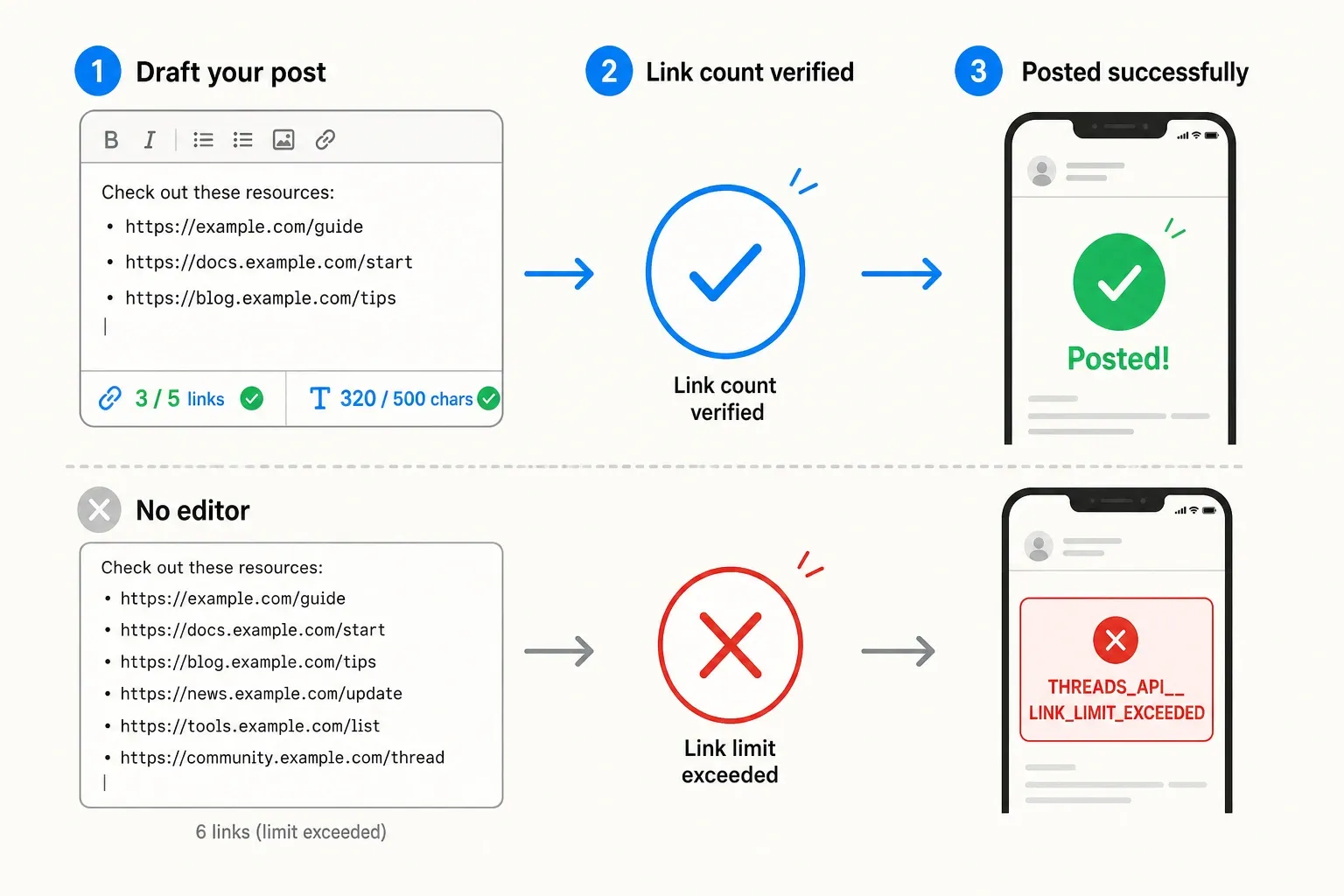
PostTruncate link-counting flow: safe drafting path versus the blocked path when links exceed 5
None of this requires an account or an upload. The editor runs entirely in the browser - nothing leaves your device - and it’s free.
The link landscape on Threads in 2026
It’s worth noting that the 5-link rule arrived alongside a meaningful shift in how Threads treats links overall. As of May 2025, Meta reversed a prior policy that deprioritised posts with links in recommendations. Posts with links now surface more often, not less. Meta also added link-click analytics so creators can track performance - a signal the platform is actively building toward a creator monetisation layer, not away from it.
For affiliate marketers, this is the context that makes the 5-link limit worth understanding properly rather than just working around. The platform is becoming more link-friendly at the same time, the limit is being more formally enforced. The opportunity is real; the constraint is structural. Knowing the exact rule - 5 unique URLs, enforced since December 2025, hard-blocked at publish - is the foundation for building a Threads affiliate strategy that actually survives contact with the platform.
Try PostTruncate
PostTruncate is a free, browser-based character counter and post editor built for social creators. The Threads editor shows your character count, URL count, and fold preview in real time - so you know exactly how many links are in your draft before you try to publish it.
If you’re writing link-heavy posts for Threads - deal roundups, affiliate lists, resource threads - drafting in PostTruncate first removes the guesswork. You’ll see the link count, the character budget, and where your post folds on mobile, all before you touch the app.
FAQs
How many links can you put in a Threads post?
Threads enforces a maximum of 5 links per text-only post. This limit has been officially enforced since December 22, 2025. Posts with 6 or more unique URLs fail to publish with the error code THREADS_API__LINK_LIMIT_EXCEEDED. The PostTruncate Threads character counter counts your URLs in real time so you know before you hit publish.
What happens if I put more than 5 links in a Threads post?
Your post fails at the publishing step with the error code THREADS_API__LINK_LIMIT_EXCEEDED. This is a hard block - the post does not go live, and no partial version is published. You need to remove links until you are at 5 or fewer before trying again.
Does Threads count duplicate links separately?
No. If you include the same URL twice in one post, Threads counts it only once toward the 5-link limit. Unique URLs are what matter. If you also include a link attachment (the preview card), it counts as an additional link unless its URL already appears in the post text.
Can I put more than 5 links across a multi-post Threads thread?
Yes. The 5-link limit applies per individual post, not per thread. A thread of three connected posts can carry up to 15 unique links total - 5 per post. Splitting a link-heavy roundup across a sequential thread is the most reliable workaround for affiliate marketers and newsletter writers. Use the PostTruncate Threads editor to draft and count links in each post before publishing.
How many links can I put in my Threads bio?
Your Threads bio supports up to 5 separate links - completely independent of the per-post limit. A link-in-bio tool like Linktree lets you consolidate a larger collection of affiliate links behind a single bio URL, effectively multiplying your clickable destinations while using just one of the five bio slots.


Join the discussion
Comments are reviewed before they appear, so yours won’t show up right away.