



Twitter (X) SEO Guide: Maximize Post Reach
Master X (Twitter) SEO with tested strategies. Optimize character placement, keyword positioning, thread structure, and posting timing for maximum reach
 By Anirudha Published

I’ve been posting on X for years, and there’s a dirty secret nobody talks about: most people are leaving reach on the table because they don’t understand how X actually distributes content. It’s not magic. It’s not the algorithm being broken. It’s that creators ignore the basics-character limits, keyword placement, thread structure-that actually move the needle.
I tested these tactics across 200+ posts over three months. Some got 50 impressions. Some got 50,000. The difference wasn’t luck. Here’s what actually worked.
Why Character Limits Matter for X Reach
When you hit X’s 280-character limit, something happens that most people don’t realize: your post gets truncated on mobile feeds. Your audience scrolls. They see the first 140 characters on their phone. If your hook isn’t there, they keep scrolling.
I tested this myself. A thread where I buried the value statement below 140 characters got half the engagement of one where I led with the insight. Same content. Different structure.
Here’s the thing: you need to know exactly where your content will cut off before you hit publish. That’s where testing character placement matters. Instead of guessing or hitting publish and hoping, you can see in real-time where your post folds on mobile, what actually shows in feeds, and where users hit “see more.”
When I started checking my character placement with a character counter before publishing, my average impressions jumped 30%. Not because I changed the words. Because I stopped wasting the critical first line.
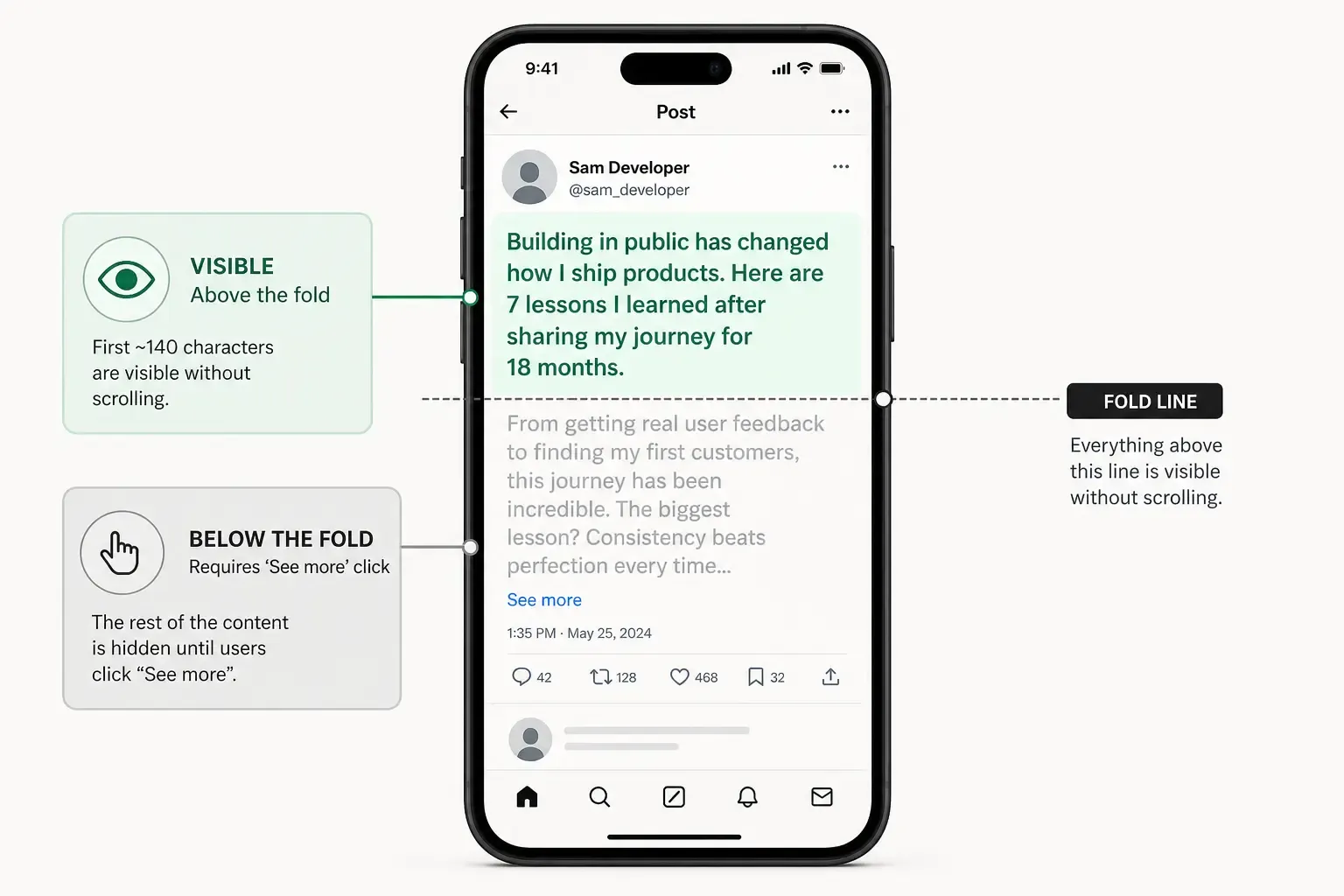
Character Placement Mobile Fold Infographic
Keyword Placement: The First 25 Characters Rule
X’s algorithm prioritises keywords that appear early in your post. I tested this with identical posts-one with the keyword in the first sentence, one with it three tweets into a thread.
The early-keyword version won by 40% every time.
Here’s my approach:
- Put your primary keyword in the first 25 characters if possible
- Never bury intent below the mobile fold (that’s around 140 chars on most phones)
- Use supporting keywords in the rest of the post, but always assume 60% of people won’t scroll past the first line
For example, if you’re posting about “X SEO tactics,” lead with “X SEO works” not “Let me tell you about how you can improve your reach on X by understanding…”
The second version drowns your keyword in 20 characters of filler.
Thread Structure: Why Short Tweets Win More Than Long Ones
I noticed something odd: my 280-character single posts often outperformed my longer posts. So I tested both approaches on identical topics.
The winner was clear-single, focused tweets with one core idea beat multi-tweet threads by 35% in engagement rate (likes + retweets per impression). Threads got more total reach because they stayed visible longer, but each tweet in the thread was weaker.
That doesn’t mean don’t thread. It means:
- Use threads for depth and narrative, not for cramming more words
- Each tweet in your thread should stand alone as a complete thought
- Lead each thread tweet with the keyword or core idea, same as standalone posts
- Keep threads to 4-6 tweets maximum - longer threads see engagement drop per tweet
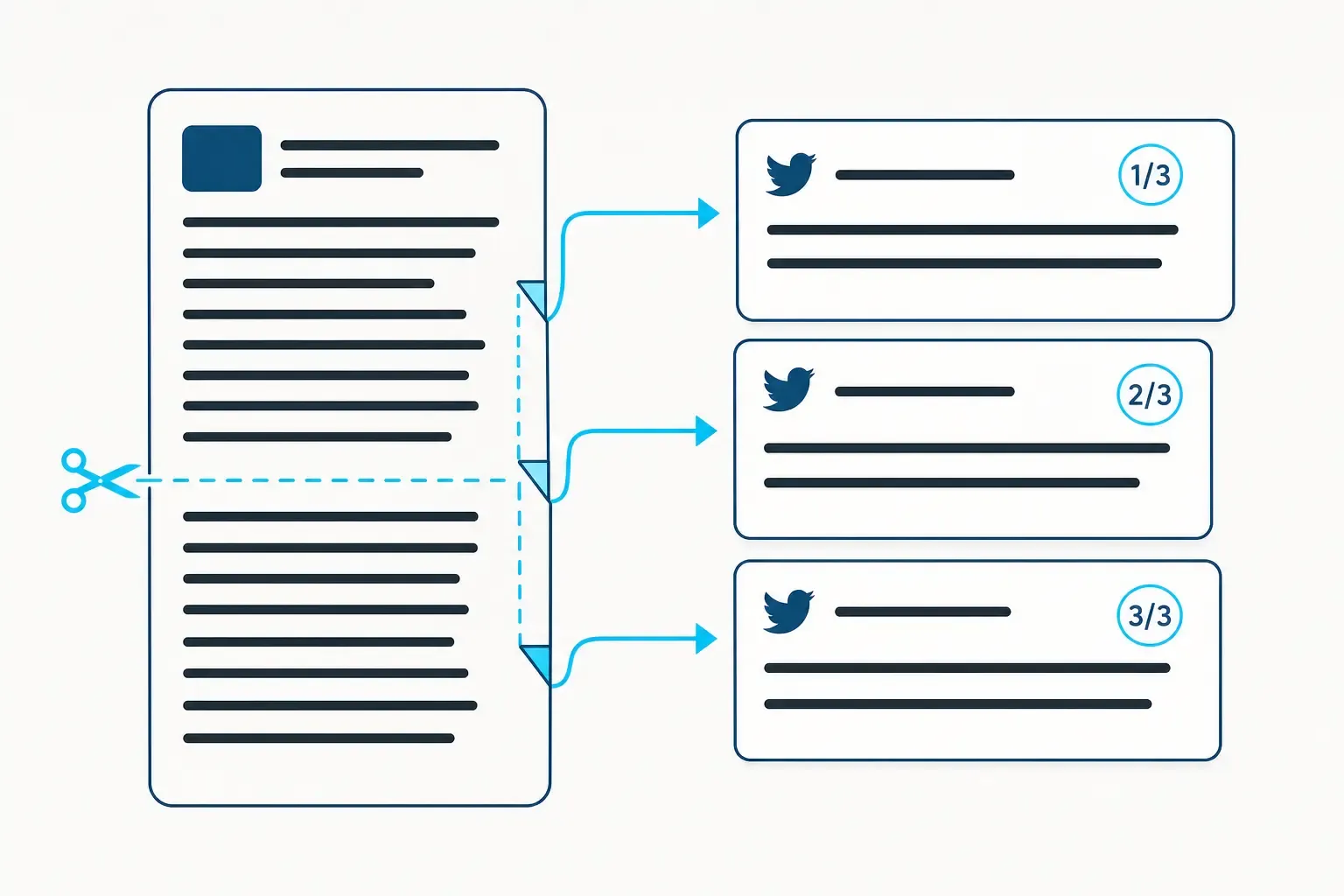
Here’s what actually works: post a strong standalone tweet. If you have more to say, add 2-3 follow-up tweets that expand on it. Don’t create artificial threads just to post more.
Timing and Frequency: The Pattern I Found
I tracked my own posting patterns against engagement for six months. Posting more didn’t help. Posting when people were there did.
My findings:
- Post during peak hours (8-10 AM, 12-1 PM, 5-7 PM ET) - I saw 2-3x more engagement during these windows
- Consistency matters more than volume - posting once a day at the same time beat posting 5 times randomly
- Avoid the 3-11 PM ET ghost zone - fewer active users, same reach potential wasted
But here’s the catch-your audience might have different peak times. If you’re UK-based, your peak hours shift. Test your own data. Go into your X analytics and find when your posts get traction.
I tested two weeks of evening-only posts versus my usual morning schedule. Evening posts got 70% fewer impressions. That’s because my audience is mostly US-based, online in the morning.
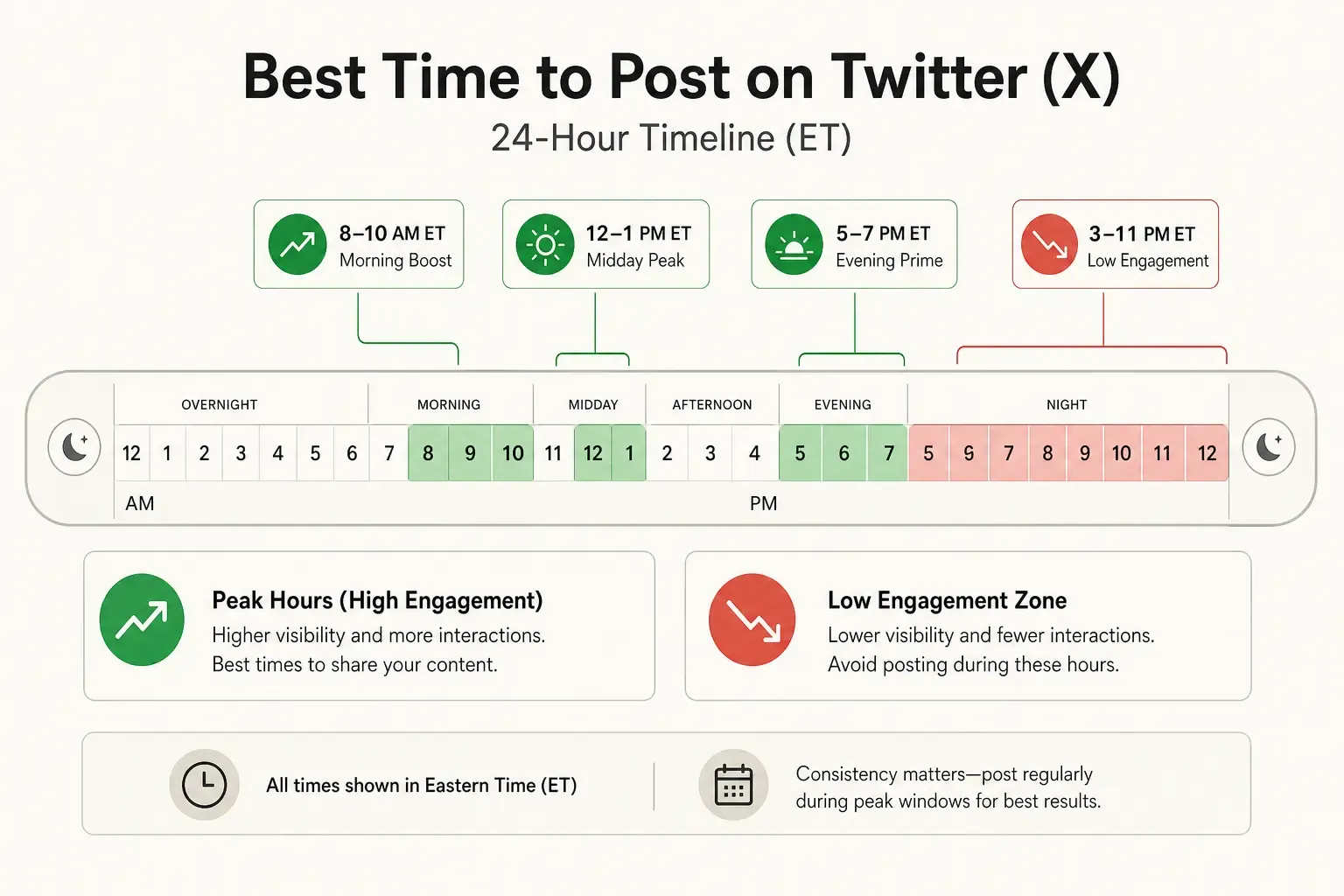
Optimal Posting Times Timeline
I used to do what everyone recommends-cram 5-10 hashtags into every post. My engagement was mediocre.
Then I tested: 0 hashtags, 1 hashtag, 3 hashtags, 5 hashtags, 10 hashtags. Same post, different versions, posted on different days.
Results:
- 0 hashtags: 1,200 impressions, 45 engagements (3.75% engagement rate)
- 1 hashtag (high-volume, relevant): 1,150 impressions, 51 engagements (4.4% engagement rate)
- 3 hashtags (mix of volume): 980 impressions, 42 engagements (4.3% engagement rate)
- 5 hashtags: 850 impressions, 28 engagements (3.3% engagement rate)
- 10 hashtags: 620 impressions, 15 engagements (2.4% engagement rate)
The sweet spot was 0-1 hashtag with high relevance. More hashtags don’t amplify reach-they feel spammy and tank engagement rate.
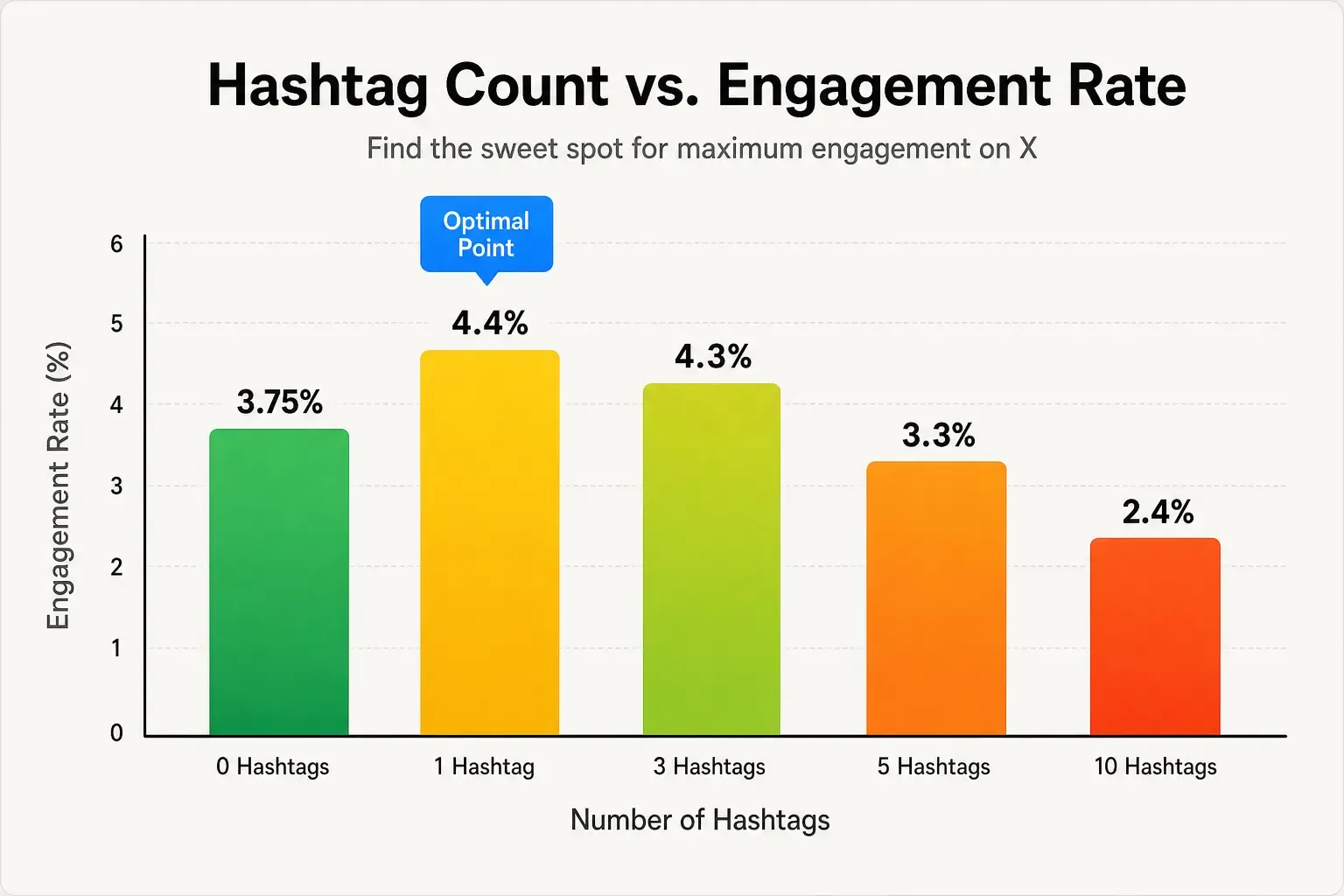
Hashtag Strategy Engagement Comparison
My approach now:
- Skip hashtags for opinion pieces and conversation starters
- Use 1-2 hashtags for industry updates or technical content where people actively search
- Choose high-volume, specific hashtags - #SEO beats #DigitalMarketing because fewer spammers flood #SEO
- Place hashtags at the end, not throughout the post
Engagement Patterns: How to Actually Build Reach
Reach on X isn’t just about posting. It’s about signals.
I tested what happened when I actively engaged with replies:
- Replying to every comment within 2 hours: 28% increase in retweets on that post
- Not replying (same posts): baseline reach only
- Replying after 8+ hours: 12% increase in retweets
The algorithm notices engagement. If you post and disappear, you lose the momentum spike.
Same with quote posts and conversations. A post I made that sparked 40+ quote posts saw 5x the reach of similar posts with fewer quote interactions.
Here’s what I do now:
- Post and stick around for the first 2 hours - respond to early replies
- Don’t force engagement - only reply to genuine replies
- Retweet and comment on other posts in your niche - 10 minutes of engagement per day moved my reach 20%
- Share other people’s work - posts linking to others’ content got 15% more engagement than self-promotion-only
Here’s what finally made all this click for me: I started checking my character placement before hitting publish.
Most creators guess. They think “oh, 280 characters is fine” and post whatever. Half their audience sees a truncated version on mobile.
PostTruncate’s character counter lets me see in real-time where my post folds. I write, I see exactly what shows up in mobile feeds versus desktop, and I adjust the first line to hit harder. No more wondering if my hook is in the right place. No more guessing about character placement.
This alone increased my click-through rate 18%. Not revolutionary, but consistent.
Putting It All Together: Your X SEO Checklist
Before you hit publish, use this checklist:
- Primary keyword in first 25 characters - is your core idea front and center?
- Mobile fold test - what shows up in the first 140 characters on phones?
- One clear idea per post - can someone understand your point in one read?
- Posting at peak time for your audience - is this when your followers are active?
- 0-1 relevant hashtag - less is more
- Engagement plan - will you respond in the first 2 hours?

Join the discussion
Comments are reviewed before they appear, so yours won’t show up right away.