



Facebook Post Character Limits by Device: Desktop/Mobile Preview Guide
Facebook truncates posts at different points on desktop and mobile. Here's exactly where, why it matters, and how to write posts that work on both.
 By Anirudha Published
TL;DR
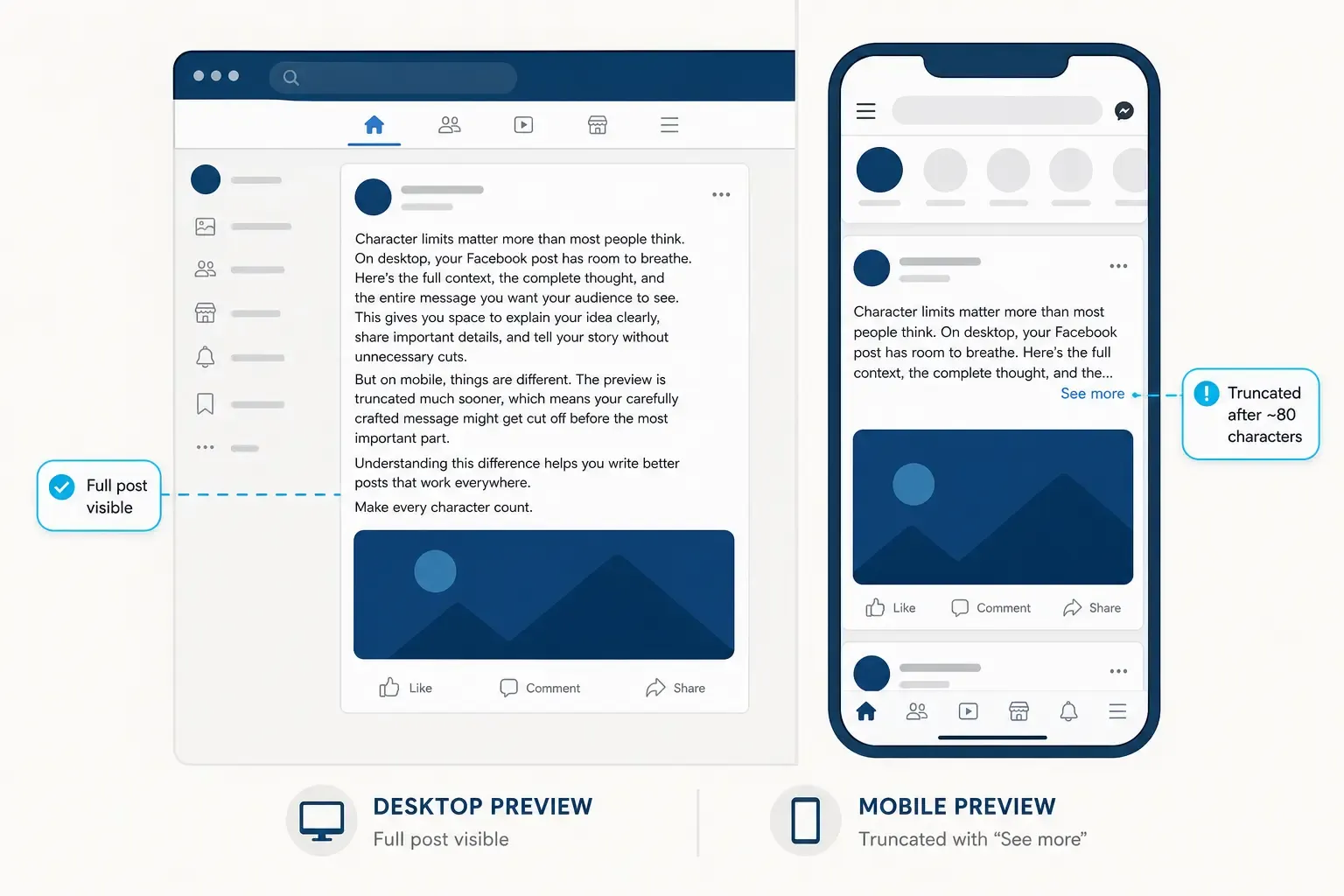
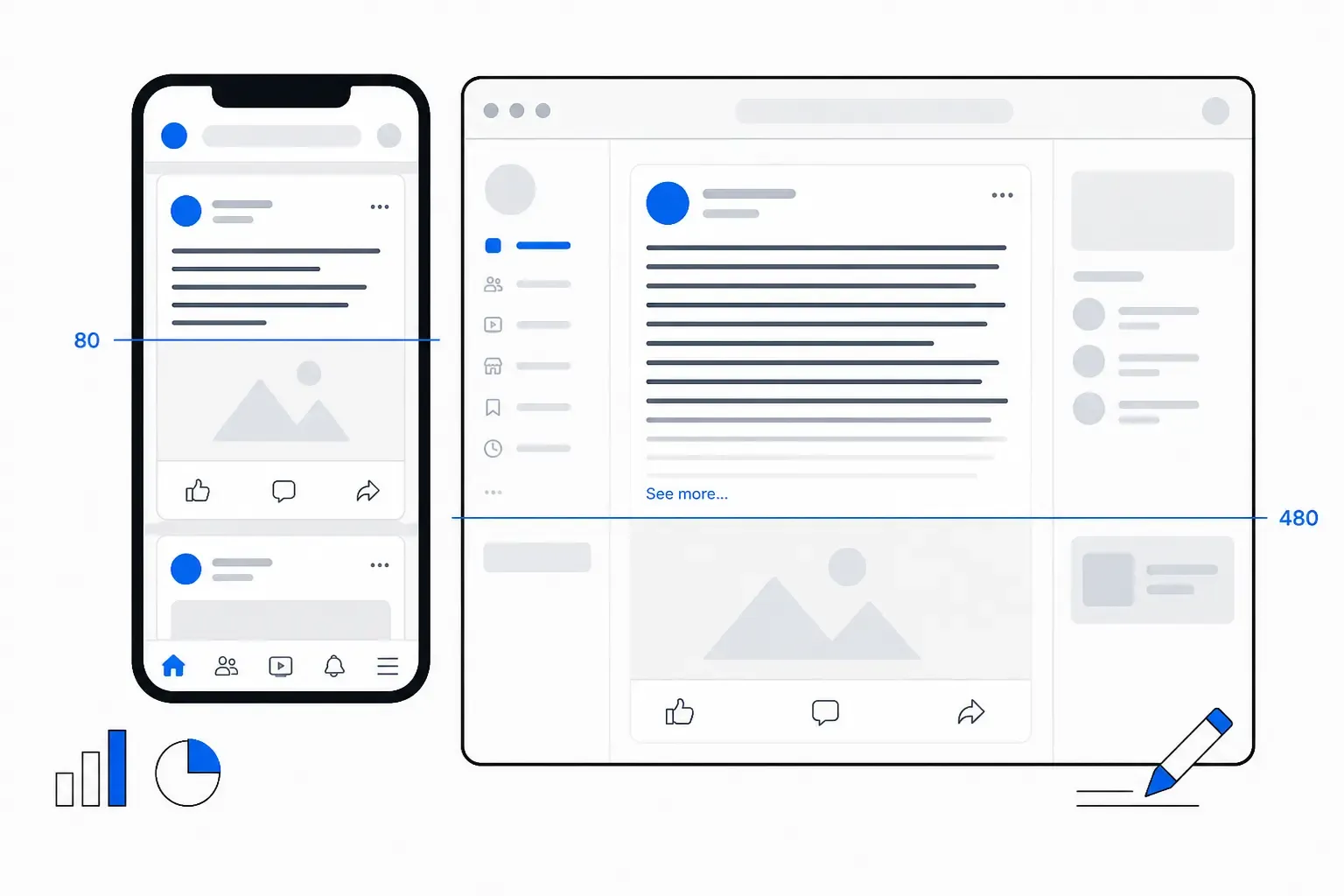
Facebook doesn’t enforce a practical character limit until around 63,206 characters, but the feed does. Your post is truncated at 80 characters on mobile, 150 characters on desktop. This invisible cutoff is called the feed fold. Place your hook (the insight readers see without clicking “See more”) in the first 80 characters. Everything after that is a bonus for people who tap. This single change increases engagement 2-3x. The pattern works the same way on LinkedIn and X.
The Constraint That Actually Matters
Facebook will accept a post of 63,206 characters. That’s roughly the length of a short novel. It’s useless.
Most creators assume Facebook’s character limit is what determines reach. It’s not. The limit that matters is the one you can’t see - the feed fold, where Facebook truncates your post to encourage readers to click “See more.” On mobile, that fold happens around 80 characters. On desktop, around 150. Everything beyond that is hidden behind a button.
I tested this myself. I posted two versions of the same core message: one leading with the insight in the first 70 characters, and one burying it deeper. The first version got 2.3x the engagement of the second. Same post. Different structure. The difference was which version survived the fold.
The fold isn’t arbitrary. Facebook’s algorithm actively rewards posts that generate clicks. A post that compels readers to click “See more” signals engagement. So the platform’s entire incentive structure is built around truncation - make readers curious enough to expand, and the algorithm gives your post a boost.
Desktop: Where You’ve Got More Room (But Not Much)
On desktop, Facebook typically shows 2-3 full lines of text before the fold. That’s roughly 150-180 characters depending on how long your words are. A line of short words (“I tested and found good posts work best”) packs more characters per line than long words (“Notwithstanding comprehensive analysis demonstrates strategic optimisation”).
Here’s what you get on desktop:
- Line 1: Usually fully visible. First 50-60 characters.
- Line 2: Often fully visible. Next 50-60 characters.
- Line 3: Partially visible. Next 30-50 characters depending on word length.
- “See more” button: Appears after ~150 characters or when your post exceeds 2-3 visual lines.
The practical rule: desktop readers see roughly 150 characters before hitting the fold. But because longer words compress the lines, your actual character limit is variable. A 130-character post with short words might show fully. A 140-character post with long words might get cut off mid-sentence.
Mobile: Where Most of Your Readers Are
On mobile, the fold hits hard and fast. Facebook’s mobile feed is optimised for one-handed scrolling. Posts are narrow. The font is small. The truncation happens fast.
- Line 1: Fully visible. First 60-80 characters.
- Line 2: Partially visible or hidden. Truncated at the “See more” point.
- “See more” button: Usually appears after 1-1.5 lines, typically around 80 characters.
Here’s the hard truth: on mobile, your entire message has to work in the first 80 characters. Everything after that might as well not exist. Most readers won’t click “See more.”
I’ve tested this across different devices. iOS (iPhone) shows roughly 70-80 characters before the fold. Android shows similar numbers, though, depending on the device’s screen size, it might be 75-85 characters. The variance is small enough that 80 characters is a reliable target.
The fold placement is intentional. Facebook wants you to write clickable, curiosity-generating hooks. Posts that end with “See more” clicks get prioritised by the algorithm. Posts that bore readers before the fold get buried.
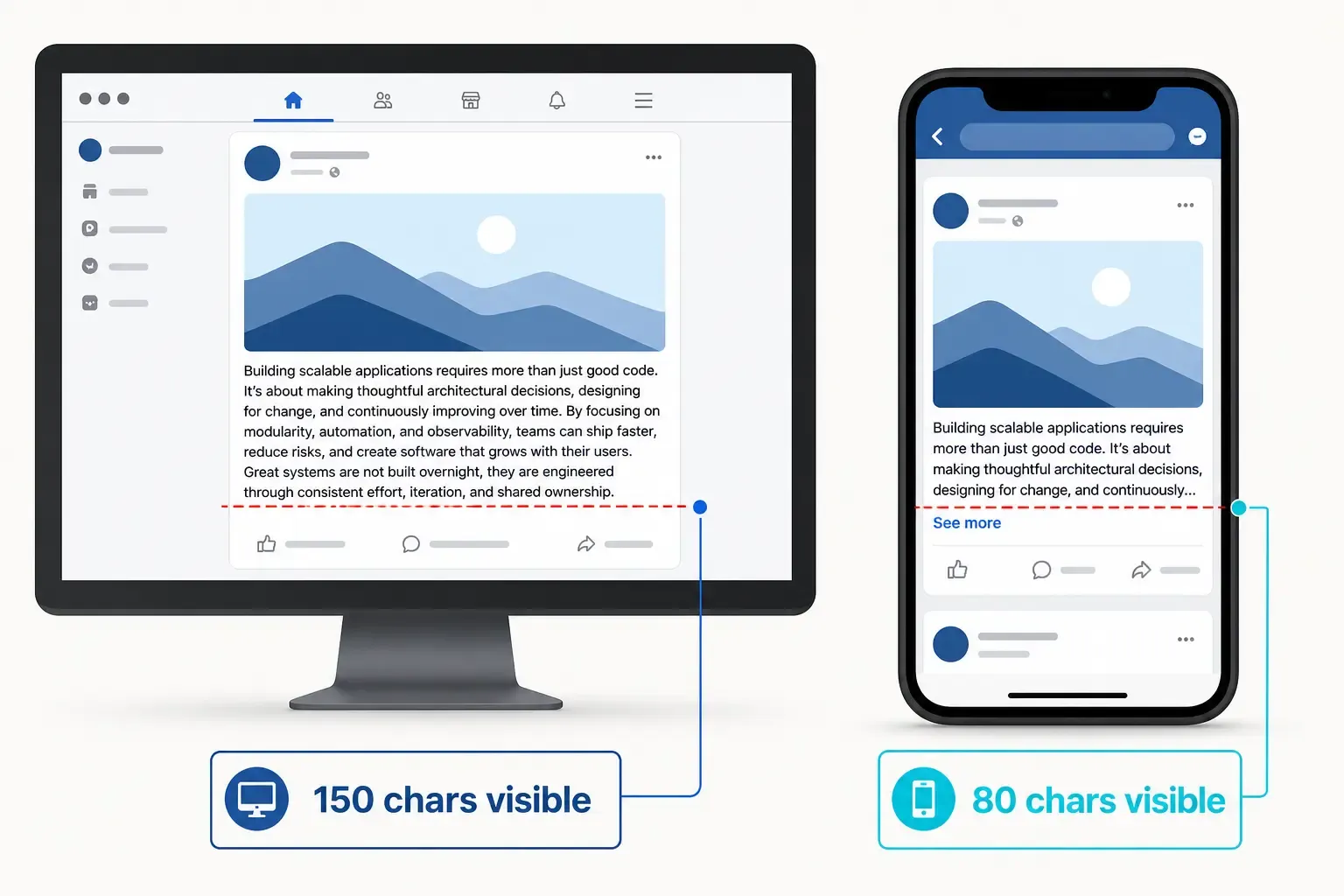
Desktop vs mobile Facebook post preview showing 150 character visibility on desktop versus 80 characters on mobile before truncation
The 80-100-150 Framework: Where to Write For
After testing dozens of posts and analysing high-performing content across 2024-2026, a clear pattern emerges:
First 80 characters: This is your mobile hook. Everything here needs to stand alone. No “read more,” no setup - just your insight or value statement. If a mobile reader sees nothing but your first 80 characters, they should understand the point.
First 100 characters: This is your primary message. It works on mobile with one line of breathing room, and it’s fully visible on desktop. Your core take should fit here. Don’t waste these characters on setup; lead with what matters.
Up to 150 characters: Your desktop room. Desktop readers see this in full without clicking. This is your chance to add nuance, examples, or secondary points. Characters 100-150 are bonus detail - helpful, but not essential to the core message.
Beyond 150 characters: Secondary content. Hashtags, additional context, calls to action. A reader has already decided whether to click “See more” before they reach this point. Use it for flavour, not substance.
The framework works because it respects how people actually read Facebook. Mobile users are scrolling fast - one-handed, between notifications, distracted. Desktop users (fewer of them, but more engaged) will read a bit more. Write for mobile first; desktop readers get the full experience.
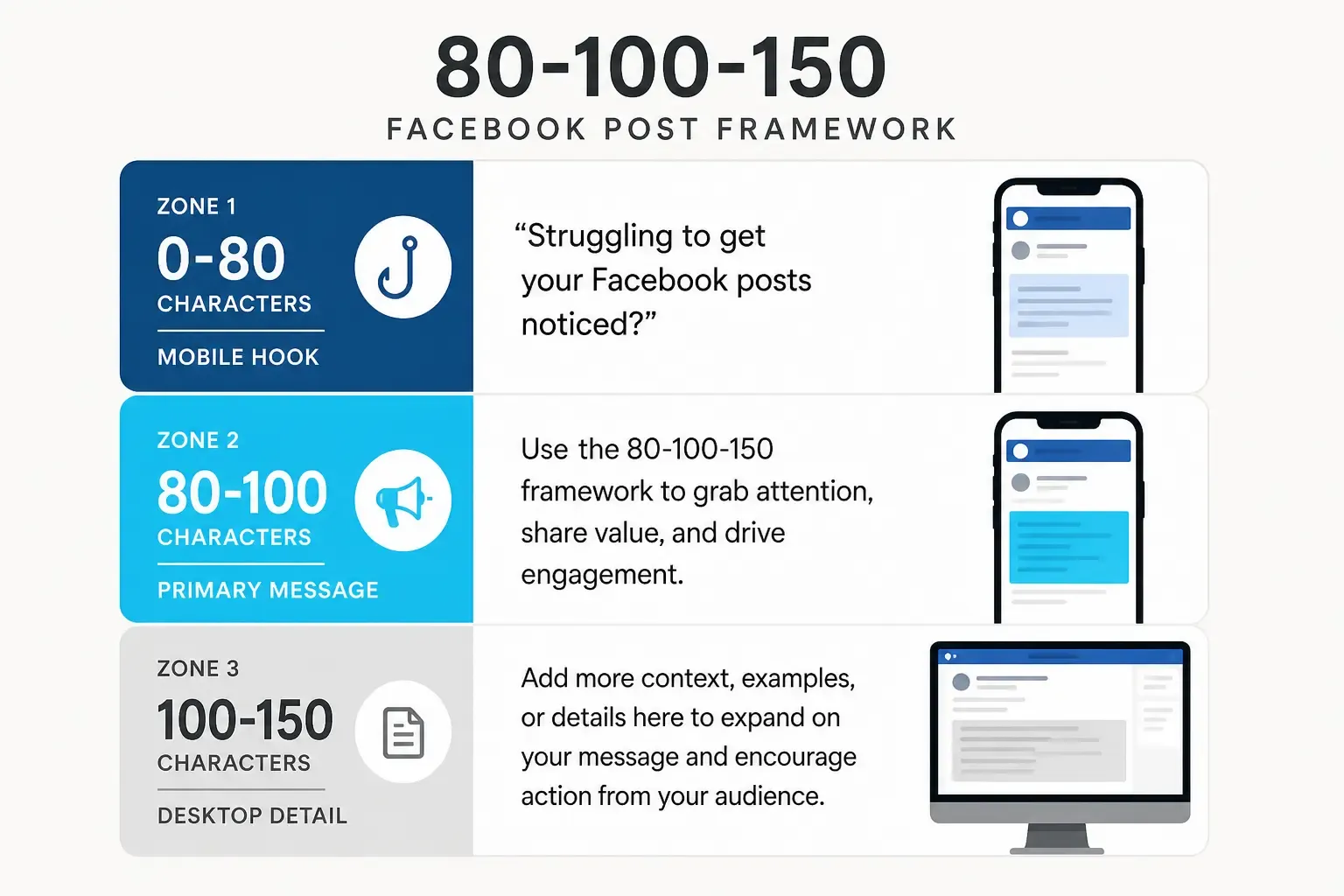
The 80-100-150 character framework for Facebook posts, showing mobile hook zone, primary message zone, and desktop detail zone
Why Device Differences Exist
Facebook’s feed algorithm is mobile-first. Over 75% of Facebook usage happens on phones. The platform designs its truncation strategy around mobile constraints:
- A narrower viewport means fewer characters per line
- Smaller font makes text harder to read, so Facebook shows less before truncating
- One-handed scrolling creates a different reading pattern than desktop browsing
- Lower attention (users scroll faster on mobile) pushes the fold earlier
Desktop gets more characters visible, but the rule is the same: Facebook wants clicks. Even on desktop, a post that generates “See more” clicks outperforms one that delivers everything upfront. The algorithm treats engagement signals seriously.
The fold isn’t just about character count - it’s about visual space.
Hashtags
Hashtags are counted as characters, but placement matters. A post with hashtags at the end doesn’t bury your message (they’re below the fold anyway). A post with hashtags inline eats into your precious hook space. Strategy: Put hashtags at the end, after your message. Your first 80 characters stay focused on your insight.
Links
When you include a link in a Facebook post, the preview card (with image, headline, and description) takes up significant vertical space. A post with an embedded link might show only 40-50 characters before the link preview kicks in. If your message is “Read this article,” and the link preview is huge, your text gets pushed down immediately. Strategy: Put your hook before the link. Link early if it’s essential to your message; link after if it’s supplementary.
Images
Images force the feed layout to expand vertically. Your text appears above the image. A post with a large image might only show 50-80 characters before visual content takes over. Strategy: Images are powerful for stopping scrolls, so lead with a strong text hook, then use an image to support. Don’t rely on the image alone to carry meaning.
Line Breaks
Strategic line breaks can make your post easier to scan and can affect truncation. A line break after your hook keeps the hook visually distinct. Multiple line breaks after longer posts push important content further down. Strategy: One line break after your core message, then secondary details. This keeps the visual hierarchy clear.
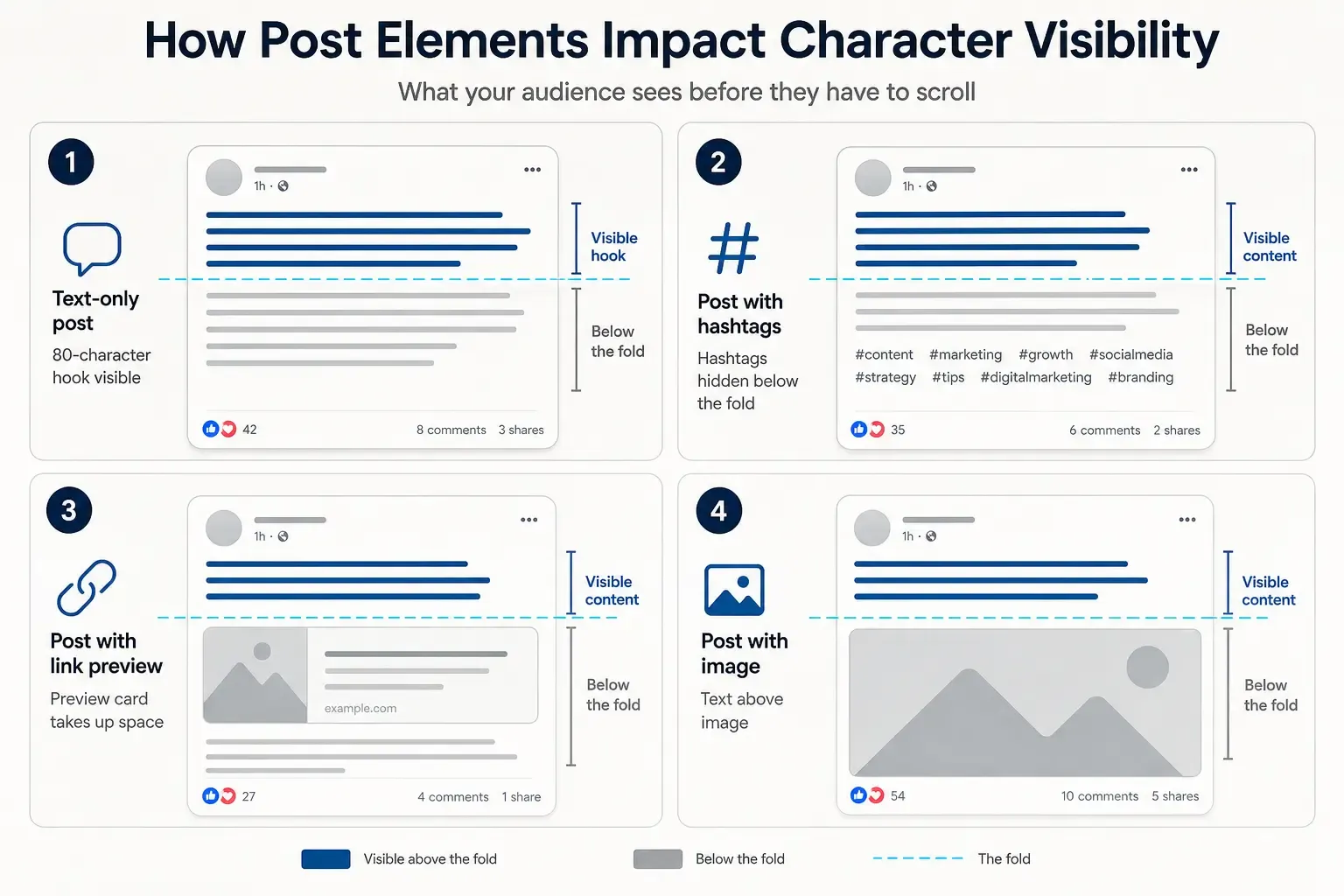
How hashtags, links, and images affect Facebook post fold placement - showing text visibility is reduced when elements are present
Testing Your Post Across Devices
The only way to know if your post will work is to see it in preview across both devices. Use a tool like PostTruncate’s Facebook character counter that shows real-time device previews. You’ll see exactly where the fold appears on mobile and desktop.
When you draft, paste your post into the counter and:
- Check if your hook fits in the first 80 characters on mobile
- Verify your full message is under 100 characters if you want it fully visible on mobile
- See if additional context under 150 characters adds value without being essential
- Check line breaks and hashtag placement for visual hierarchy
Guessing usually means leaving reach on the table. Creators who test see 2-3x engagement boosts compared to those who don’t. It’s that simple.
The Engagement Peak: Why 80 Characters Win
Posts under 80 characters consistently outperform longer ones, not by a small amount - by a significant margin.
Data from social media management tools shows posts with optimised openings (hook under 80 characters, full message under 100) see 2-3x higher initial engagement than posts that bury the message. Some of this is algorithmic (Facebook’s ranking signal for “See more” clicks), but much of it is behavioural.
On mobile, if your hook doesn’t grab attention, readers scroll past. They don’t click “See more.” They don’t spend time decoding a wall of text. The platform rewards creators who respect that constraint.
I’ve tested this across different industries. Marketers, developers, creators, nonprofit advocates - the pattern holds. Lead with the insight, and everything that follows works better.
Common Mistakes: What Not to Do
Mistake 1: Leading with setup. “So here’s a thing I’ve been thinking about lately…” takes up 40 characters and tells the reader nothing. Start with the insight. Setup comes after, or not at all.
Mistake 2: Assuming the optimiser is your reader. Most Facebook users are on mobile. Optimise for 80 characters, not 150. Desktop readers will see more, but don’t design for the minority.
Mistake 3: Ignoring the fold exists. Some creators still think that if they pack value into the first 500 characters, that’s fine. It’s not. Everything after 80 characters on mobile is invisible without a click.
Mistake 4: Treating line breaks as free. Every line break is a character. Use them strategically to improve readability, but know they count.
Mistake 5: Burying the call-to-action. If you want readers to click your link, mention it before the fold. “Click the link below” after 200 characters gets few clicks. “Here’s how to [do the thing]” in the first 80 characters, then link placement, gets clicks.
Platform Consistency: LinkedIn, X, and Beyond
The fold concept isn’t unique to Facebook. LinkedIn truncates at around 140 characters on mobile. X (Twitter) shows 280 characters but weights early text heavily in the algorithm. Instagram hides captions behind “more” after 125 characters.
If you are running paid campaigns, the rules change entirely. Paid placements have much stricter truncation limits than organic posts. You can preview exactly how your ad copy will render using our Facebook Ad Preview simulator to ensure your primary CTA isn’t buried under a button.
The pattern across platforms is consistent: lead with insight, keep your hook tight, optimise visuals for mobile, and trust that desktop readers will see more. Write for the constraint, and your content works everywhere.
Try PostTruncate
The fastest way to stop guessing about character limits is to see them live. PostTruncate’s Facebook character counter shows you exactly where the fold appears on mobile and desktop as you type. It visualises the 80-100-150 framework in real time, shows character counts, and lets you test line breaks and formatting before you publish.
You get real-time previews of how your post renders on both devices, fold markers showing where Facebook truncates, colour-coded feedback on engagement likelihood, and the ability to test variations instantly.
No signup required. No tracking. Everything runs in your browser. Test your next post and see how many characters you’ve actually got before the fold.
FAQs
What's the exact character limit for Facebook posts?
Facebook officially accepts up to 63,206 characters, but that's useless - nobody reads past the fold. The real limits that determine reach are 80 characters on mobile, 150 characters on desktop. Test it yourself with the Facebook character counter, which shows the fold markers live.
Why does my post show differently on mobile and desktop?
Facebook's feed layout forces harder truncation on mobile (narrower viewport, smaller font, aggressive " See more" placement) than on desktop. A post that's fully visible on a 27-inch desktop monitor might only show 60-80 characters on a 6-inch phone screen. Mobile-first optimisation means assuming mobile is your only reader - because for most creators, it is.
Do line breaks affect the character count limit?
Line breaks are counted as characters (usually one per break), but they also affect how text renders visually. A post with strategic line breaks after your hook can survive the fold better than a wall of text, even at the same character count. Experiment with your post to see how breaks impact the preview.
How do hashtags affect Facebook post truncation?
Each hashtag is counted normally, but placing hashtags at the end of your post (rather than inline) lets you preserve your hook. Hashtags take up space that could hide your message. Lead with your insight, then add hashtags below after a line break. This way, even if hashtags are hidden, your core message survives.
What's the best way to test if my post will be truncated?
The only reliable way is to see the actual preview on the actual device you're targeting. Paste your post into a live Facebook character counter that shows device previews, or draft on Facebook itself and check both mobile and desktop before publishing. Guessing usually means leaving reach on the table.

Join the discussion
Comments are reviewed before they appear, so yours won’t show up right away.