



The Hidden Cost of Emojis in SMS Marketing
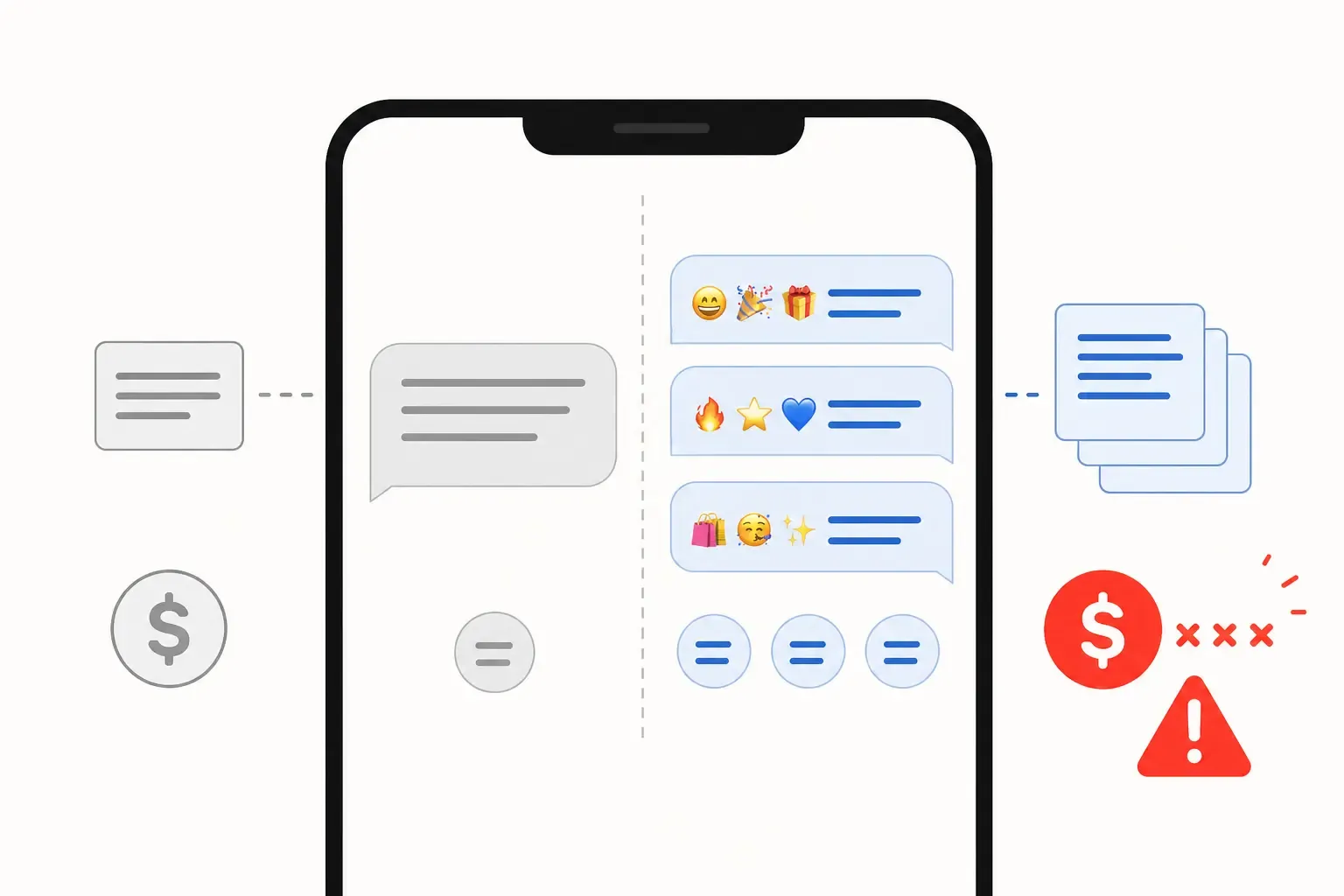
A single emoji can triple your SMS campaign budget overnight. Here's the GSM-7 vs Unicode encoding switch that no one warns marketers about - and how to catch it before you hit send.
 By Anirudha Published
TL;DR
SMS billing is per-segment, not per-message. GSM-7 encoding gives you 160 characters per segment; Unicode cuts that to 70. A single emoji, curly quote, or em dash anywhere in your message flips the entire thing to Unicode automatically. On a 10,000-message blast, that switch can push your cost from $80 to $240 before you’ve noticed anything has changed. Most SMS platforms don’t warn you. Before your next broadcast, paste your copy into PostTruncate’s free SMS segment calculator - it flags the exact character causing the problem and shows you the true segment count in real time.
The “one small change” that doubled a campaign budget
Picture this: your copywriter is polishing the final SMS for a flash sale. The message is 152 characters, well within limits, one segment. Then they add a fire emoji to the subject - *🔥 FLASH SALE: 30% off all weekend* - because it performs well in email subject lines, and the thinking is, why not?
The message goes out. It looks fine in the platform preview. The campaign runs.
The bill arrives.
It’s $240. The estimate was $80. The platform billed 30,000 segments for a 10,000-message send.
Nobody made a mistake in the obvious sense. But nobody checked the encoding either.
This is the scenario I built PostTruncate to prevent. I’ve seen versions of it happen more times than I can count - not just with emoji, but with a copywriter pasting a headline from Google Docs (curly quotes baked in), or someone adding an em dash for emphasis, or a campaign template that worked fine in English failing expensively when translated to French with accented characters.
The root cause is always the same: an invisible encoding switch that most SMS platforms don’t surface, don’t warn about, and certainly don’t explain on the invoice.
The technical problem in plain language
SMS was built on a character encoding called GSM-7 - a 7-bit standard that covers the basic Latin alphabet, digits, and a limited set of punctuation. When your message stays within that character set, each segment can hold up to 160 characters.
The moment any character outside that set appears in your message, the whole thing switches to Unicode (UCS-2), a 16-bit encoding that can represent virtually any character in existence - emoji, accented letters, Arabic, Chinese, smart quotes, you name it. The tradeoff: Unicode segments hold only 70 characters instead of 160.
That’s not a rounding error. It’s a 56% reduction in capacity per segment.
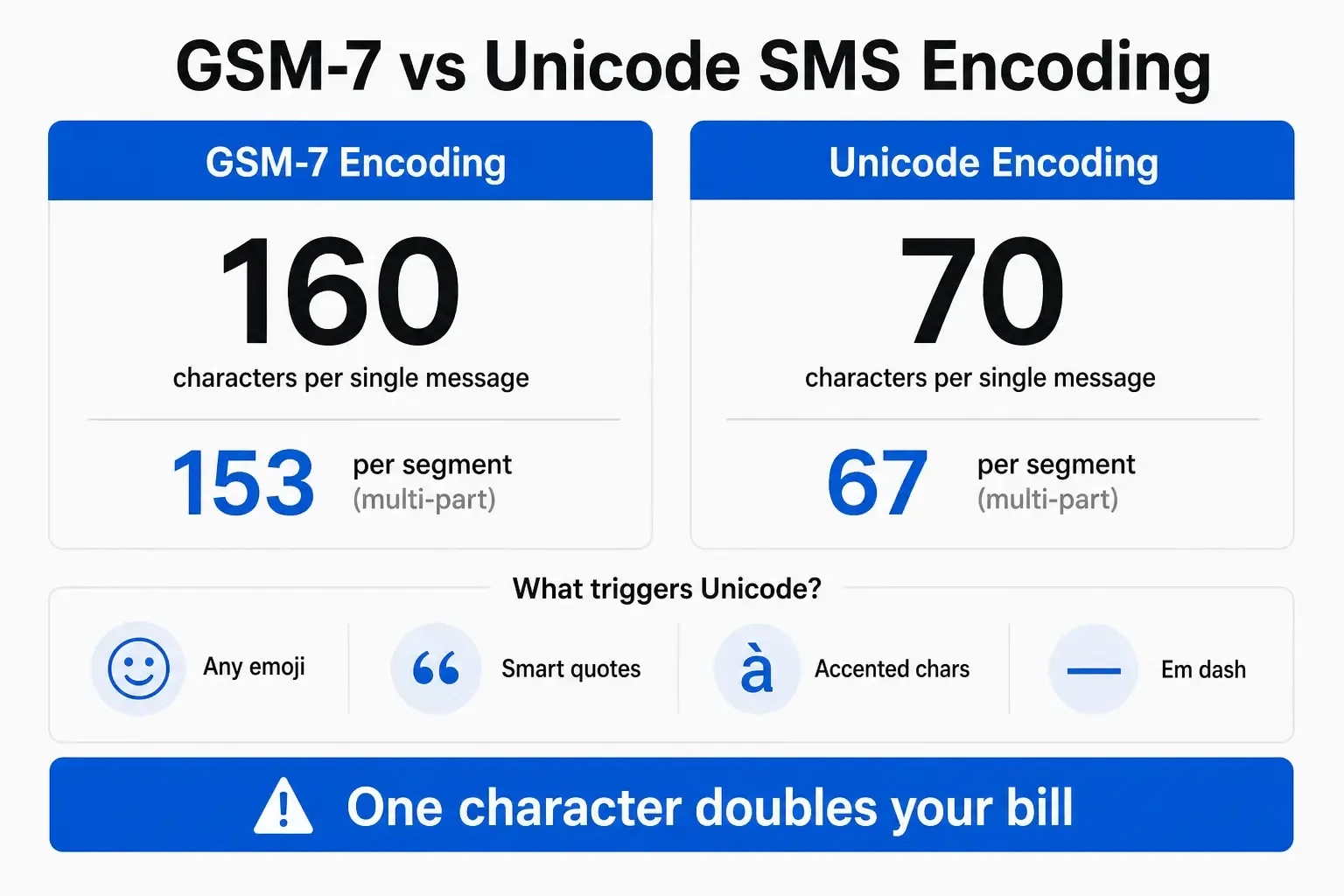
GSM-7 vs Unicode SMS encoding comparison: 160 characters per segment vs 70 characters per segment, with common Unicode triggers shown
There’s also an overhead cost when messages are split across segments. In GSM-7 multipart messages, 7 characters per segment are reserved for headers - so your usable characters drop from 160 to 153 per segment. In Unicode multipart messages, it’s 3 characters reserved, leaving you 67 usable per segment instead of 70. A message that’s slightly over one segment doesn’t just cost 2x - the capacity change applies retroactively to the first segment too.
The extended GSM-7 trap
Worth calling out separately: even within the GSM-7 character set, a handful of characters count as 2 characters each. The Euro sign (€), square brackets ([ and ]), curly braces ({ and }), backslash (), pipe (|), tilde (~), and caret (^) are all in the GSM-7 extended table. Including any of them eats double the character budget without switching to Unicode. It’s a smaller gotcha, but it’s real. A price point like “Get €50 off” costs 2 extra characters before you’ve typed anything else.
What flips the switch
The characters that trigger a full Unicode conversion are the ones that appear constantly in marketing copy written by humans using real software:
- Any emoji - the single most common trigger. One emoji anywhere in the message forces the entire message to Unicode.
- Smart/curly quotes (” ” ’ ’) - Microsoft Word and Google Docs insert these automatically. When a copywriter drafts in Docs and pastes into your SMS platform, the quotes come with them.
- Em dashes (-) - standard in editorial writing, entirely absent from GSM-7. Plain hyphens (-) are fine; em dashes are not.
- Accented characters - é, ñ, ü, à, and any other accented Latin letter. If your campaigns include any multilingual copy, non-English names, or words like “naïve” or “café,” you’re triggering Unicode.
- €, £, ¥ - the Euro and Pound symbols are not in the standard GSM-7 character set. The dollar sign ($) is.
None of these is exotic characters. They’re the exact characters that appear in professionally written marketing copy every day.
The math that wrecks your budget
Let me show you exactly what this looks like on real numbers, because the abstract description doesn’t fully land until you see the bill.
Scenario: 10,000-message campaign, $0.008 per segment
The base case: a 140-character message with no special characters. Pure GSM-7. One segment per message.
10,000 messages × 1 segment × $0.008 = $80.00
Now your copywriter adds a single fire emoji to punch up the opening line. The message is still 141 characters, but encoding has switched to Unicode. At 70 characters per segment with a 3-character header overhead (67 usable), a 141-character message requires 3 segments.
10,000 messages × 3 segments × $0.008 = $240.00
The emoji cost you $160.
Alternatively, consider a slightly longer message: 250 characters, no emoji, clean GSM-7. That’s 2 segments (160 + 90). Total: $160. Add smart quotes from a Word paste, and you’ve switched to Unicode. That same 250 characters now requires 4 segments (67 + 67 + 67 + 49). Total: $320. Your budget estimate was wrong by 100%.
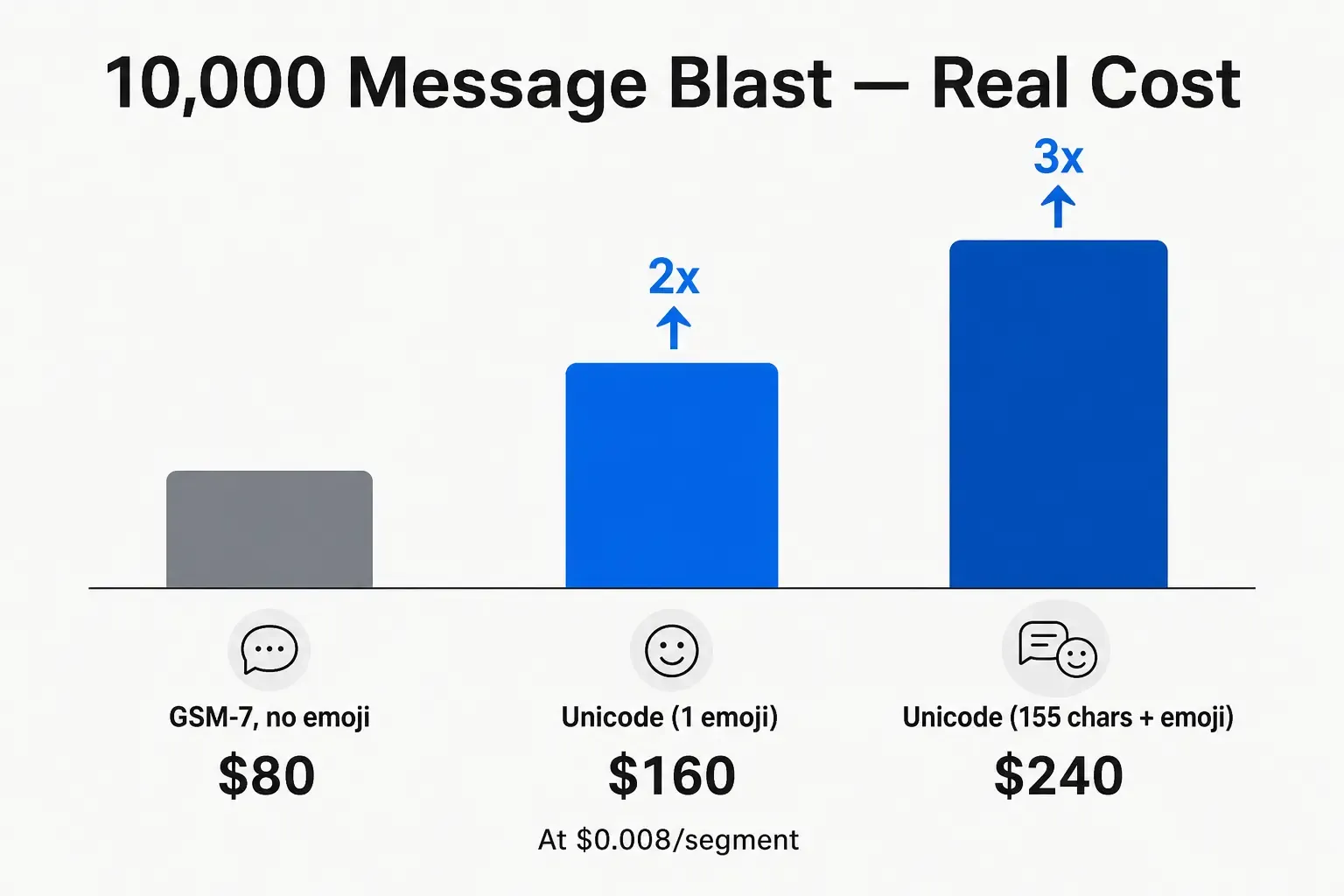
SMS campaign cost comparison: 10,000 messages at GSM-7 vs Unicode encoding, showing a 2x to 3x cost increase from the encoding switch
Scale that to a larger list. A 500,000-message holiday campaign where copy was pasted from a Word doc - smart quotes throughout - switching from 2 segments to 4 is the difference between $8,000 and $16,000. I’ve seen marketing teams genuinely believe there was a billing error when this happened. There wasn’t. There just wasn’t a check.
“We send a weekly promo with ‘50% Off’ and thought we were clever. Turns out our system was converting that to smart quotes. Our SMS bill went from $200/week to $400/week. Support said ‘yeah, that’s Unicode encoding’ like it was obvious. It wasn’t obvious to us.” - practitioner post, r/MarketingTechnology
That quote is from one of dozens of threads I’ve read on Reddit where people discovered this the same way: by reading their invoice.
The copy/paste trap
The single most common source of unexpected Unicode in marketing campaigns isn’t emoji - it’s content pasted from Microsoft Office or Google Docs.
Both applications use curly (typographic) quotes by default. When you type " in Word, the application converts it automatically to " or " depending on position. Same with apostrophes. The visual difference is almost invisible in most fonts. The encoding difference is 0 vs Unicode.
The typical workflow that causes this: a copywriter drafts the SMS template in Google Docs, passes it through review, and a campaign manager pastes the approved copy into the SMS platform. The curly quotes survive the paste invisibly. The message looks correct in the platform preview. It ships as Unicode.
There’s no malfunction here. Every piece of software did what it was designed to do. But the result is a campaign that costs twice what it was supposed to, as discovered when the invoice arrives.
A similar trap exists with em dashes. Marketing copy often uses them for rhythm: “Flash sale - this weekend only.” That em dash (-) is a Unicode character; replacing it with a hyphen-hyphen (—) or a plain hyphen (-) keeps you in GSM-7. Most copywriters don’t know this distinction exists.
What your SMS platform probably isn’t telling you
Here’s the uncomfortable truth about most SMS marketing tools: they don’t show you encoding status.
You see the character count. You see the message preview. On some platforms, you see a segment count. Very few show you which encoding your message is using and, critically, which character triggered a switch.
Platforms like Twilio and Africa’s Talking do surface encoding status in their builders - if you know where to look. Many white-label SMS tools, ESP-integrated SMS features, and third-party campaign builders handle encoding silently. The preview renders fine. The cost math runs in Unicode. You find out later.
This is a gap in the tooling, not a mystery of physics. Encoding detection is not technically hard. The information exists in the message; it just isn’t surfaced to the person writing the copy.
Catching it before you hit send
The fix is straightforward: check your encoding before you send, not after.
PostTruncate’s SMS segment calculator does this in real time. Paste or type your message, and it immediately shows you whether you’re in GSM-7 or Unicode mode, how many segments the message will consume, and exactly where the segment boundaries fall. If a character has triggered Unicode, it flags which one.
There’s also a one-click Emoji Stripper in the format toolkit. If your copy came in from Docs or Word and you want to clean it before sending, strip everything at once and check the segment count again.
The PostTruncate platform limits page has a full reference table for both SMS encoding modes - segment capacities, extended character behaviour, multipart header overhead - in one place if you want to bookmark it for your team.
Everything runs in the browser. No sign-up, no upload, no account required. Your copy stays on your device.
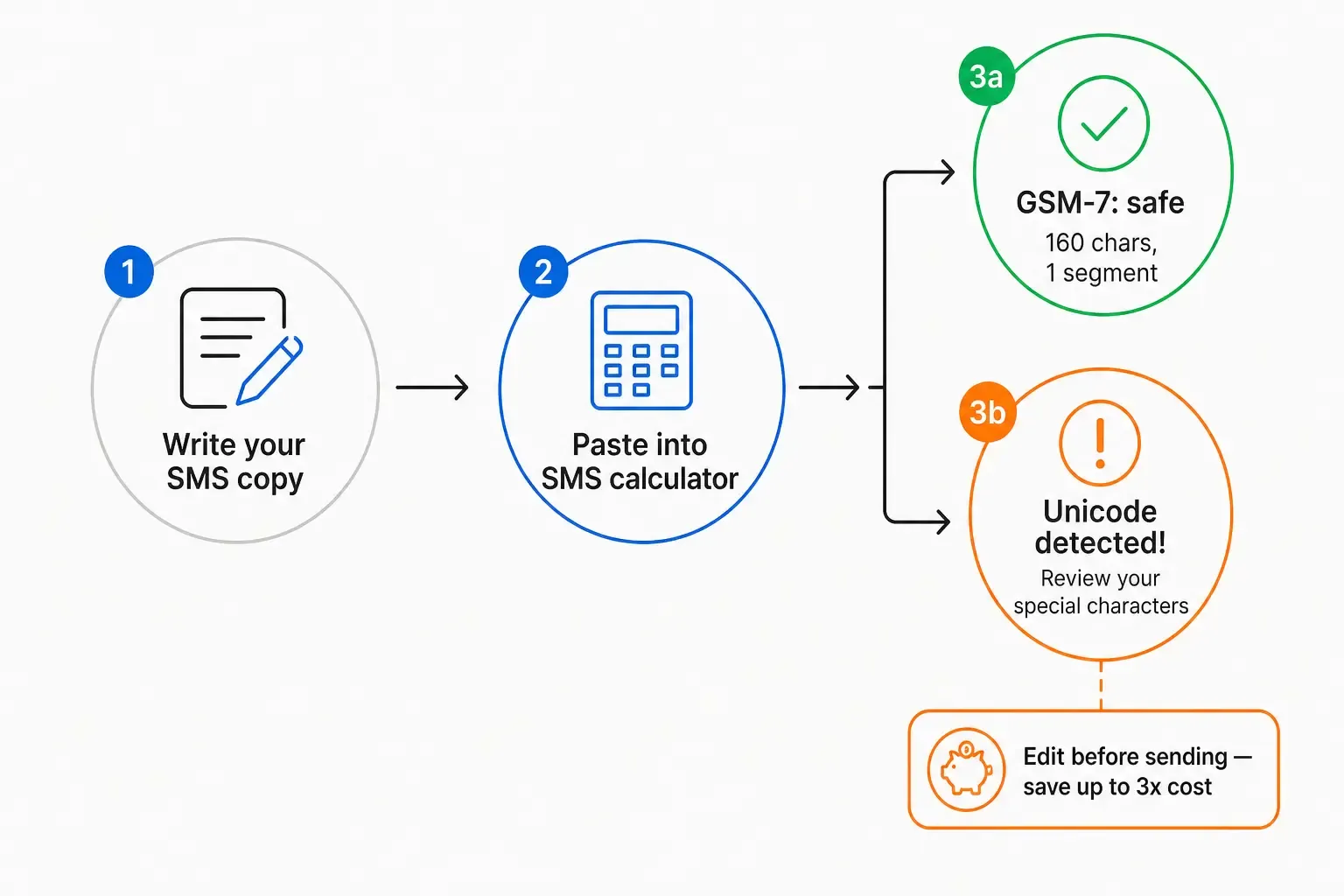
3-step workflow: write SMS copy, paste into encoding detector, then review and fix before sending - preventing billing surprises
A few practical habits worth building into your SMS workflow:
- Check the segment count for every new campaign template. Not just the character count - the segment count. They’re different numbers, and the segment count is the one on your invoice.
- Never paste directly from Word or Docs into your SMS platform. Paste into a plain-text editor first (Notepad, TextEdit in plain-text mode, VS Code), then copy again. Or paste into PostTruncate’s SMS tool and strip any characters that don’t belong.
- Decide deliberately whether an emoji is worth the cost. Emoji absolutely works in SMS marketing - the performance data is real. But a blanket “add emoji for engagement” policy without encoding awareness is a budget decision made without the relevant information. A 3x cost multiplier changes the ROI math considerably. Know the number before you commit.
- Build encoding checks into your A/B testing. If you’re testing an emoji variant against a plain-text variant, you’re testing two different cost structures. Make sure your cost-per-result math accounts for that.
Try PostTruncate
I built PostTruncate as a solo developer because I kept running into the exact problem this post describes. The SMS calculator was the first tool I shipped with real encoding intelligence - it detects GSM-7 vs Unicode automatically, shows segment boundaries in real time, and pinpoints the character causing the switch so you can make an informed decision rather than a surprised one.
It’s completely free, covers 10+ platforms including SMS, LinkedIn, X, Instagram, Facebook, and Threads, and runs entirely in your browser without storing your copy anywhere. No account, no paywall, no catch.
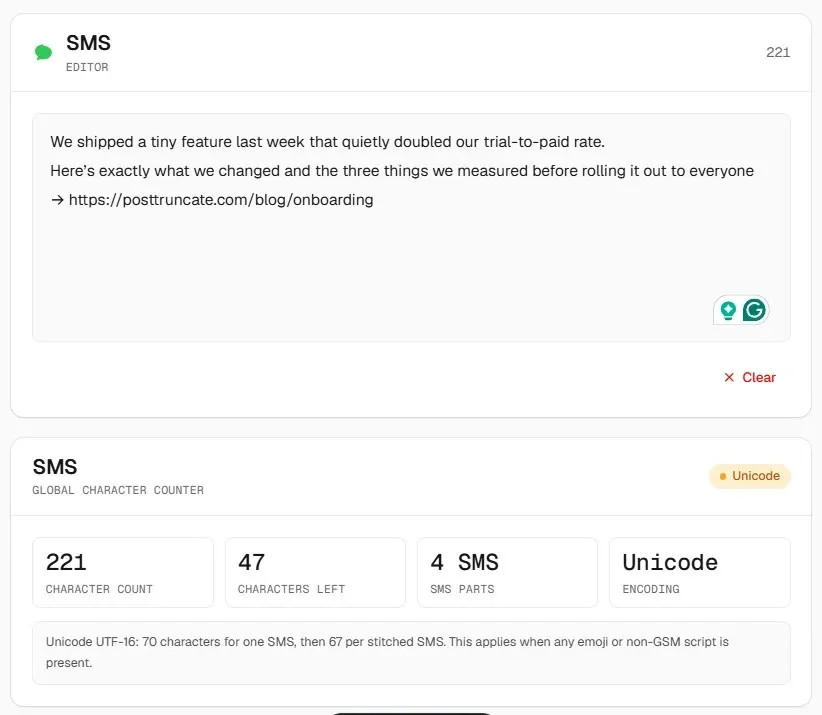
PostTruncate SMS character counter - free, browser-based encoding detection and segment calculator
Before your next SMS broadcast goes out, paste the copy into PostTruncate’s SMS encoding checker. If you’re in Unicode when you expected GSM-7, you’ll see it before it ships - and you’ll have the option to fix it.
The check takes 10 seconds. The alternative is reading it on the invoice.
FAQs
What is the difference between GSM-7 and Unicode SMS encoding?
GSM-7 is the standard SMS encoding that supports 160 characters per message segment, covering basic Latin letters, digits, and common punctuation. Unicode (UCS-2) supports any character - emoji, accented letters, smart quotes, non-Latin scripts - but cuts the per-segment limit to just 70 characters. The critical catch: if a single non-GSM character appears anywhere in a message, the entire message switches to Unicode automatically. You can check which encoding your message uses with the PostTruncate SMS segment calculator.
How much can an emoji actually increase my SMS marketing costs?
Significantly. A 155-character message without any emoji sits comfortably at 1 GSM-7 segment. Add a single emoji and the whole message flips to Unicode - at 70 characters per segment, that same 155-character message now requires 3 segments instead of 1, tripling the cost. On a 10,000-message blast at $0.008 per segment, that's the difference between $80 and $240. On a 500,000-message holiday campaign, you're looking at $2,000 to $6,000+ in unexpected overspend.
What characters trigger Unicode encoding in an SMS?
Any character outside the GSM-7 character set will trigger Unicode for the entire message. The most common culprits: emoji (any emoji at all), smart/curly quotes (“”‘’) which are automatically inserted by Microsoft Word and Google Docs, em dashes (—) used in marketing copy, accented characters like é, ñ, ü, and the Euro symbol (€). The plain hyphen (-) and straight apostrophe (') are safe. The Euro sign (€) is also worth noting: while it's in the extended GSM-7 set, it counts as 2 characters.
Does my SMS platform warn me when encoding switches to Unicode?
Most don't. Platforms like Twilio and Africa's Talking do show encoding status in their builders, but many white-label SMS platforms, ESPs, and marketing tools apply encoding silently. You see the message preview; you don't see which encoding it's using or how many segments it will consume. This is exactly why checking your copy with a dedicated SMS encoding detector before hitting send is so important.
Is there a free tool to check SMS character count and encoding before sending?
Yes. PostTruncate's SMS character counter is completely free, requires no sign-up, and runs entirely in your browser. It detects your message encoding in real time (GSM-7 or Unicode), shows you exactly where segment boundaries fall, flags the specific character that triggered Unicode encoding, and even includes a one-click Emoji Stripper so you can clean up copy that came in from Word or Docs before it ships.
Join the discussion
Comments are reviewed before they appear, so yours won’t show up right away.